Automating Azure DevOps Build Pipelines using API – Guidelines
Today in this article, we will see how to use API for Automating Azure DevOps Build Pipelines using Run Pipeline API.
Updated October 2026: a section on branch, parameters and variables, a section on authentication and checking results, an FAQ, and corrected api-version and PAT details.
We will see an example of how to trigger Azure Pipelines build via API. AS we learned in the last article we have below two approaches to call REST API for Build pipeline,
- Build -Queue API
- Runs – Run Pipeline API
We already looked at the Build queue approach in the previous article.
Today in this article, we will cover below aspects,
For more details please see below article,
Both approaches have similar settings/configuration steps and hence they are easy to configure.
Trigger a build using – Run Pipeline
Build pipeline
POST https://dev.azure.com/{organization}/{project}/_apis/pipelines/{pipelineId}/runs?api-version=6.0-preview.1
Build pipeline With optional parameters
POST API
POST POST https://dev.azure.com/{organization}/{project}/_apis/pipelines/{pipelineId}/runs?pipelineVersion={pipelineVersion}&api-version=6.0-preview.1
Input Parameters
In the above Post request below are the input parameters,
- organization – The name of the Azure DevOps organization.
- project – Project ID or project name
- api version – Version of the API to use.
Request Body
- definition – The build number/name of the build.
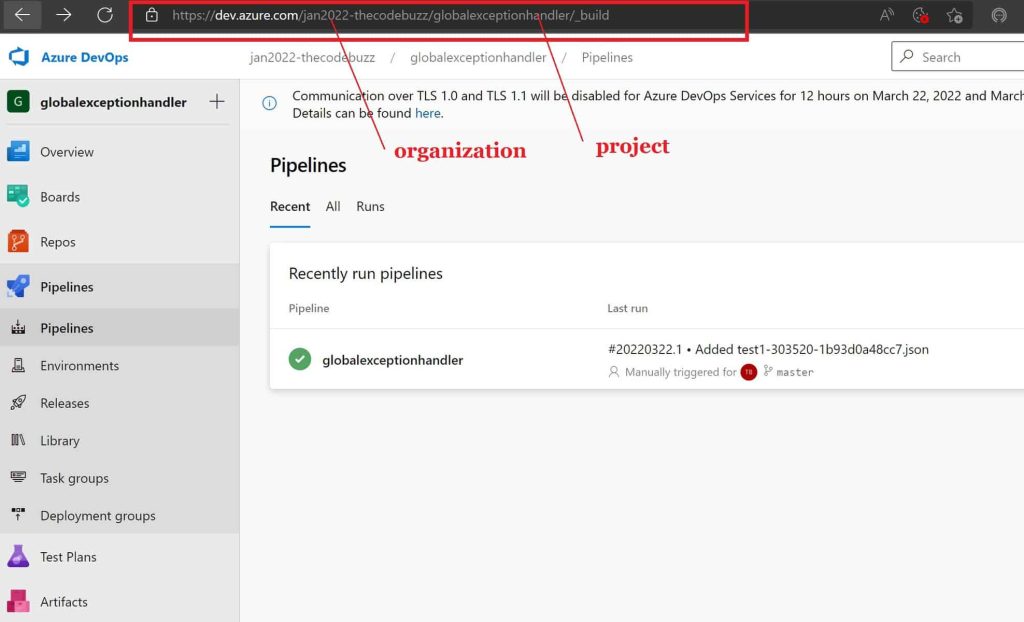
Below is our sample repository,
https://dev.azure.com/jan2022-thecodebuzz/globalexceptionhandler/_build
Configuration and security
Let’s now configure the API to be invoked securely.
Step1- Click on the User settings and set up the personal access token.
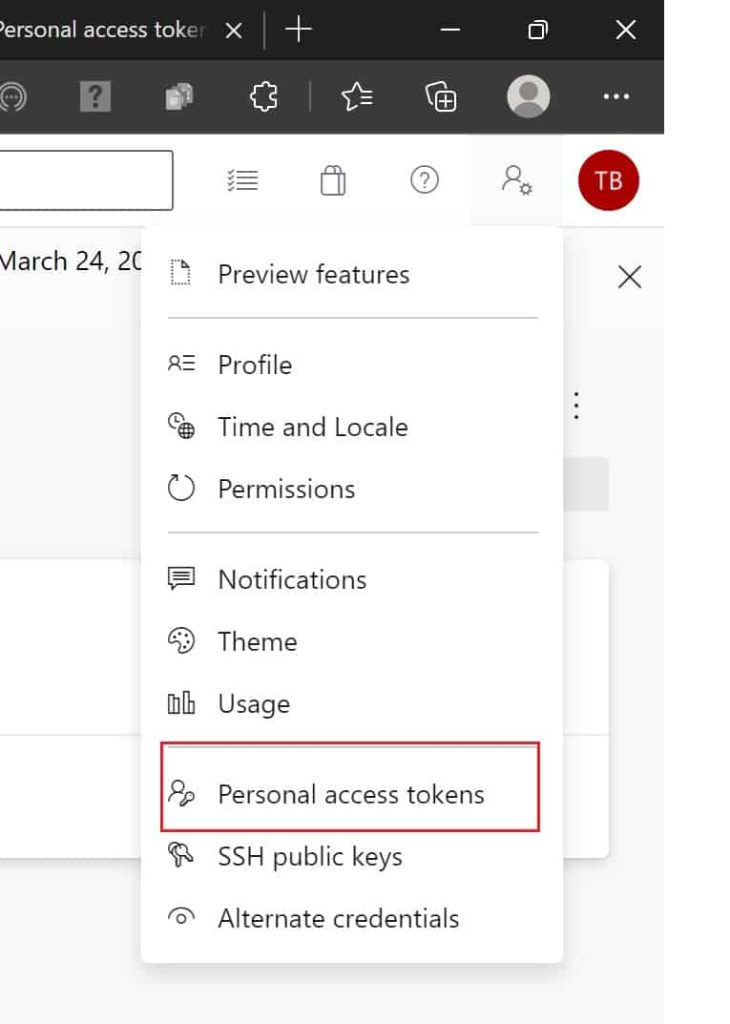
Define a name for this token and authorize the scope of access with this token. For this API, choose the Build (Read & execute) scope and nothing broader. Keep the expiry short.
Finally below is our URL and input request object defined,
URL
https://dev.azure.com/jan2022-thecodebuzz/globalexceptionhandler/_apis/pipelines/5/runs?api-version=6.0-preview.1
Let’s now use Postman to execute the API. Please set up the Basic authentication in the Postman by leaving the username empty (or any value) and setting the password to the personal access token.
Request Object for Build Pipeline API
Below is my request body,
{
    "resources": {
        "repositories": {
            "self": {
                "refName": "refs/heads/master"
            }
        }
    }
}
Response from Build Pipeline API
Below is a sample response,

Once you execute the POST API, please check your pipeline. You shall see it is executed and triggered for a build successfully,
References:
Do you have any comments or ideas or any better suggestions to share?
Please sound off your comments below.
Happy Coding !!
Authenticate without a PAT and check whether the run passed
A personal access token (PAT) with the Build (Read & execute) scope is the minimum you need to call the Run Pipeline endpoint. You can avoid PATs entirely with Microsoft Entra tokens, or with System.AccessToken when the call comes from inside a pipeline.
How do you use a PAT safely?
Send it as Basic auth with an empty username and the PAT as the password. In curl, that means a Base64-encoded :PAT string in the Authorization header. Set a short expiry and keep the token in a secret store or secret variable, never in the script.
Which options avoid PATs?
Pick the identity that matches where the call runs:
- Service principal or managed identity: request a Microsoft Entra access token and send it as a Bearer token. Microsoft’s current samples use this approach.
- System.AccessToken: inside a pipeline, use the job’s built-in token. The build identity needs the Queue Build permission on the target pipeline, or the call is rejected.
- az rest: the Azure CLI attaches the credentials for you, so you don’t build headers by hand.
- InvokeRestAPI@1: this task now supports Azure DevOps service connections natively, so you no longer need a generic connection.
In plain English: A service principal is a staff badge issued to a program instead of a person. It can be revoked or limited without touching anyone’s personal login, which a PAT tied to your account can’t offer.
How do you check whether the run passed?
The POST only starts the run. To learn the outcome, poll GET pipelines/{id}/runs/{runId} until state is completed, then read the result field.
- Set a timeout: stop polling after a fixed time so a stuck run can’t hang your script.
- Wait between calls: a delay of several seconds is plenty for most pipelines.
- Honor throttling: on HTTP 429, wait for the number of seconds in the
Retry-Afterheader before the next request. - Fail on the result: treat anything other than a successful
resultas a failure in your automation.
Runs API or Build Queue API: which should you call?
Use the Runs API for YAML pipelines, and the Build Queue API if you already work with definition IDs. This table compares the two.
| Aspect | Pipelines Runs API | Build Queue API |
|---|---|---|
| Endpoint | pipelines/{id}/runs | build/builds |
| Targets | YAML pipelines | A build definition |
| Identifier | Pipeline ID in the URL | Definition ID in the body |
| Inputs | templateParameters, variables, resources | A parameters string |