This guide is a bookmarkable reference for developers and DBAs who run SQL Server in production. It is current for SQL Server 2022 and 2025, with runnable T-SQL, C# and Python examples. Many older checklists still repeat the “leave 4-6 GB or 10-15% for the OS” memory rule and give contradictory MAXDOP advice. They also skip the 2025 features, the current driver defaults and the upgrade pitfalls. These SQL Server best practices fix that.
It is different from the existing post, SQL Server Best Practices for Developers and DBAs (2026 Guide). This one is organised by production concern: configuration, indexing and queries, transactions, drivers, security, backups, monitoring and upgrades. Each rule explains the why, states the trade-off and gives a command to verify the result. The guide ends with an anti-patterns table and a production readiness checklist.
Before you start, you need sysadmin access on a test instance and SSMS or sqlcmd. The .NET examples use Microsoft.Data.SqlClient and the Python examples use pyodbc. Support dates, build numbers and default behaviours are correct as of October 2026. Always test every change on a non-production copy first.
Version note: This guide targets SQL Server 2022 (latest CU27, 16.0.4295.3) and SQL Server 2025 (latest CU9, 17.0.5005.3), with Microsoft.Data.SqlClient v7.0.1.
In this guide
- SQL Server Best Practices at a Glance
- SQL Server Configuration Best Practices: Memory, MAXDOP, Cost Threshold and tempdb
- Data Modeling and Indexing Best Practices
- Query Optimization and SQL Server Performance Tuning Best Practices
- Transactions, Isolation Levels and Optimized Locking
- Connection Management and Microsoft.Data.SqlClient Best Practices
- SQL Server Security Best Practices: Least Privilege, Injection and Encryption
- SQL Server Backup Best Practices, High Availability and Restore Testing
- Monitoring SQL Server: Wait Stats, Extended Events and Performance Counters
- Patching and Upgrading to SQL Server 2025: What to Check First
- Common Anti-Patterns and SQL Server DBA Production Readiness Checklist
- Key takeaways
- FAQ
SQL Server Best Practices at a Glance
This guide covers production best practices for SQL Server 2022 and SQL Server 2025, from instance configuration and indexing to security, backups, monitoring and upgrades.
The table below is a quick reference for developers, architects and DBAs. Each rule points to the section that explains the reason, so you can jump to the detail when you need it.
Quick Reference Table
| Area | Do this | Avoid this |
|---|---|---|
| Instance memory | Cap max server memory at about 75% of available memory (see Configuration). |
Leaving the default of about 2 TB. |
| MAXDOP and cost threshold | Start from the NUMA-based MAXDOP rule and tune cost threshold by measurement (see Configuration). | MAXDOP 1 server-wide, or cost threshold left at 5. |
| tempdb | Use equally sized, pre-sized data files with fixed growth (see Configuration). | One small file that relies on autogrow. |
| Storage layout | Separate data, log and tempdb volumes; enable instant file initialization (see Configuration). | Putting everything on one shared volume. |
| Data types and keys | Use the narrowest correct type and a narrow, unique, ever-increasing clustered key (see Data Modeling). | Random GUID clustered keys and nvarchar(max) for short values. |
| Indexing | Index for WHERE, JOIN and ORDER BY, and use INCLUDE columns (see Data Modeling). | Duplicate and unused indexes. |
| Query patterns | Write SARGable predicates and set-based code (see Query Optimization). | SELECT * and functions on indexed columns. |
| Isolation level | Use RCSI for read-heavy OLTP after testing (see Transactions). | Long transactions and untested isolation changes. |
| Connection strings | Keep Encrypt=Mandatory or use Strict (see Connection Management). |
TrustServerCertificate=true in production. |
| Authentication and permissions | Use Windows or Entra auth and a custom role (see Security). | Using sa or db_owner for apps. |
| Dynamic SQL | Use sp_executesql with typed parameters (see Security). |
Concatenating user input into SQL strings. |
| Backups | Use CHECKSUM, compression and off-server copies (see Backups). |
FULL recovery with no log backups. |
| Restore testing | Restore on a schedule and run DBCC CHECKDB (see Backups). |
Trusting RESTORE VERIFYONLY alone. |
| Patching | Patch on a cadence and test on a copy first (see Patching and Upgrading). | Switching between CU and GDR tracks casually. |
| Monitoring | Start with wait stats, then Query Store and Extended Events (see Monitoring). | Alerting only on whether a job ran. |
How to Read This Guide
Treat every rule as a default, not a law. Where a rule does not apply, the section states the trade-off and the case where you should do something different.
Test each change on a non-production copy and measure before and after.
SQL Server Configuration Best Practices: Memory, MAXDOP, Cost Threshold and tempdb
These instance-level settings decide how SQL Server uses memory, CPU and temporary storage. Most of them ship with defaults that suit a demo machine, not a production server, so review them on every new install, on 2022 and on 2025.
SQL Server Max Server Memory Setting
Cap max server memory on every version. The default is about 2 TB, which means SQL Server will take whatever it can and leave the OS and other processes to fight for the rest.
Current Microsoft docs suggest a starting point of about 75% of the available memory not used by other processes, including other instances on the same host. Leave min server memory at 0. Setup on Windows has suggested a value since SQL Server 2019, so check what it picked.
The older advice was to leave 4-6 GB, or 10-15%, for the OS. A percentage of what is actually available is a better baseline because it already subtracts a second instance, an SSIS service, antivirus or a monitoring agent. A fixed reserve ignores all of them.
If Lock Pages in Memory (LPIM) is granted to the service account, set a specific value. LPIM stops Windows from trimming SQL Server’s memory, so a wrong cap can starve the OS.
MAXDOP: Why OLTP Does Not Automatically Mean MAXDOP
MAXDOP (maximum degree of parallelism) is the number of CPUs one query can use. Some teams say “OLTP means MAXDOP 1”, while Microsoft publishes a NUMA-based rule. They conflict because the first is a workaround for parallelism waits and the second is a general default.
Start from the Microsoft guidance. A NUMA node (Non-Uniform Memory Access node) is a group of processors that share local memory. Keeping a query inside one node avoids slower cross-node memory access. The table below shows the starting values.
| Server layout | Recommended MAXDOP |
|---|---|
| One NUMA node, 8 or fewer logical processors | Up to the number of logical processors |
| One NUMA node, more than 8 logical processors | 8 |
| Several NUMA nodes, 16 or fewer logical processors per node | Up to the number of logical processors in one node |
| Several NUMA nodes, more than 16 logical processors per node | Half the logical processors in one node, with a maximum of 16 |
For example, a server with two NUMA nodes of 24 logical processors each would start at 12. A server with two nodes of 40 logical processors each would start at 16, because half of 40 is 20 and the cap is 16.
- Mixed workloads: Use
ALTER DATABASE SCOPED CONFIGURATION SET MAXDOPso each database gets its own limit. - One workload that needs a different limit: Create a Resource Governor workload group with its own
MAX_DOP. - MAXDOP 1 server-wide: Avoid it. Parallel index builds and reporting queries lose parallelism, and maintenance windows get longer.
Cost Threshold for Parallelism and Optimize for Ad Hoc Workloads
The default cost threshold for parallelism is 5, which is too low for modern hardware. Small queries go parallel and waste threads on coordination.
Raise it based on observed plan costs. A value in the 25 to 50 range is a reasonable test value, not a rule. After the change, compare CXPACKET and CXCONSUMER waits before and after, and check that your important queries did not slow down.
Enable optimize for ad hoc workloads when the plan cache fills with single-use plans, e.g. an ORM that sends unparameterized text. On first run SQL Server stores only a small plan stub, and the full plan is cached on the second run. The trade-off is one extra compile for queries that do repeat.
tempdb Configuration
Use several data files of equal size, pre-sized, with a fixed growth increment, on fast storage. Autogrow should be an emergency only, not the sizing method.
Many sessions create temporary objects at once, and they all compete for the allocation pages (PFS, GAM, SGAM) in a single file. That shows up as PAGELATCH waits. More files spread the allocations. SQL Server fills files in proportion to free space, so unequal sizes send most of the work to one file.
Use this rule for the file count, which follows Microsoft guidance:
- If the server has 8 or fewer logical processors, create one data file per logical processor (e.g. 4 logical processors, 4 files).
- If the server has more than 8 logical processors, start with 8 data files.
- If PAGELATCH contention on tempdb allocation pages continues with 8 files, add files in multiples of 4, and stop when the contention goes away.
More files than needed do not help and add some overhead, so do not match the core count on a large server.
SQL Server 2025 Additions
- tempdb space governance: Resource Governor can limit tempdb space per workload group. A workload that exceeds its limit is stopped with an error.
- Accelerated Database Recovery in tempdb: Now supported.
- Resource Governor in Standard edition: It has the same functionality as Enterprise. Standard 2025 is limited to the lesser of 4 sockets or 32 cores, and 256 GB of buffer pool per instance.
Storage and OS Settings
Separate data, log and tempdb volumes where your storage design allows it. Put the log on fast storage or RAID 10, because log writes are sequential and every commit waits for them (WRITELOG).
Enable instant file initialization (IFI) by granting the “Perform volume maintenance tasks” privilege to the SQL Server service account. With IFI, data file growth and restores skip zeroing the new space, so they finish much faster.
Log files are different, and the behavior depends on the version. In SQL Server 2019 and earlier, log files are always zero-initialized. In SQL Server 2022 and later, transaction log growth events of up to 64 MB can also use IFI. Larger log growths, and the initial creation of a log file, are still zeroed.
For the versions this guide targets, set the log autogrowth increment to 64 MB or less so that emergency growths are fast. Still pre-size the log to its working size, because a log that grows often creates many virtual log files and slows recovery.
Sample Configuration Script
The example below assumes one instance on a 32 GB server, so 75% is 24576 MB. It also assumes a single NUMA node with 16 logical processors. By the Microsoft rule, a single node with more than 8 logical processors gets MAXDOP 8, and the same layout gives 8 tempdb data files. Adjust all values for your own hardware.
T-SQL
EXEC sp_configure 'show advanced options', 1;
RECONFIGURE;

EXEC sp_configure 'max server memory (MB)', 24576;
EXEC sp_configure 'cost threshold for parallelism', 50;
EXEC sp_configure 'optimize for ad hoc workloads', 1;
RECONFIGURE;

-- Run in the user database that needs its own limit.
-- 8 = single NUMA node with 16 logical processors (more than 8, so cap at 8).
ALTER DATABASE SCOPED CONFIGURATION SET MAXDOP = 8;

-- Verify the instance settings
SELECT name, value, value_in_use
FROM sys.configurations
WHERE name IN ('max server memory (MB)',
               'min server memory (MB)',
               'cost threshold for parallelism',
               'optimize for ad hoc workloads');

-- Check the NUMA layout and logical processor count used for MAXDOP and tempdb sizing
SELECT cpu_count FROM sys.dm_os_sys_info;

SELECT node_id, online_scheduler_count
FROM sys.dm_os_nodes
WHERE node_state_desc = N'ONLINE';

-- Check tempdb file layout (expect 8 data files on this 16-processor server)
SELECT name, physical_name,
       size * 8 / 1024 AS size_mb,
       growth, is_percent_growth
FROM sys.master_files
WHERE database_id = 2;
Run the NUMA queries first and change MAXDOP if your layout differs. The last query should show equal size_mb values, a fixed growth in MB and is_percent_growth set to 0 for every data file.
Data Modeling and Indexing Best Practices
Good SQL Server performance starts with the table design, not the server settings. Model the data cleanly, choose small data types, and add only the indexes your queries use. These rules apply to both SQL Server 2022 and 2025.
Model to Third Normal Form First
Start with third normal form (3NF), where each non-key column depends only on the key. Denormalize only when a measured query problem justifies it.
Normalized tables avoid update anomalies, because a customer address lives in one row and not in every order. Rows stay smaller, so more rows fit on a page. Updates touch fewer rows, which means fewer locks.
Use the Narrowest Correct Data Type and Add Constraints
Pick the smallest type that safely holds the data. The clustered index key is carried into every nonclustered index as the row locator, so a wide clustered key makes every nonclustered index larger. Wide columns in any index key also add to index size, buffer pool memory and I/O.
- int vs bigint: Use
intunless you expect more than about 2.1 billion rows. - date vs datetime2: Use
datewhen no time is needed, anddatetime2(0)for second precision. - Strings: Avoid
nvarchar(max)for short values. Use a sized type such asnvarchar(100).
Declare primary key, foreign key, unique and check constraints. The optimizer uses them to build better plans, and they reject bad data at the source, before it reaches the application.
Choose a Narrow, Ever-Increasing Clustered Key
Give every table a clustered index on a narrow, unique, ever-increasing key, such as an int IDENTITY column. New rows are appended at the end of the table, and the small key is copied into each nonclustered index.
A random GUID from NEWID() inserts rows at random positions, which causes page splits and fragmentation. A GUID is also 16 bytes, which makes it a wide clustered key. If you need GUIDs, use NEWSEQUENTIALID() as a column default, or keep an identity column as the clustered key and the GUID as a separate unique column.
Design Nonclustered Indexes for Your Queries
Index the columns used in WHERE, JOIN and ORDER BY. Put equality columns first and the range column after them. Use INCLUDE for columns that are only selected, so the index covers the query without key lookups.
Example: a retail site lists one customer’s recent orders, filtering on CustomerId (equality) and OrderDate (range).
T-SQL
CREATE TABLE dbo.Orders
(
    OrderId     int IDENTITY(1,1) NOT NULL,
    CustomerId  int NOT NULL,
    OrderDate   datetime2(0) NOT NULL,
    Status      tinyint NOT NULL,
    TotalAmount decimal(10,2) NOT NULL,
    CONSTRAINT PK_Orders PRIMARY KEY CLUSTERED (OrderId),
    CONSTRAINT FK_Orders_Customers FOREIGN KEY (CustomerId)
        REFERENCES dbo.Customers (CustomerId),
    CONSTRAINT CK_Orders_TotalAmount CHECK (TotalAmount >= 0)
);

CREATE NONCLUSTERED INDEX IX_Orders_Customer_Date
ON dbo.Orders (CustomerId, OrderDate)
INCLUDE (Status, TotalAmount);
This creates a narrow clustered key, a foreign key, a check constraint and a covering index for the customer-orders query.
Remove Duplicate and Unused Indexes
Every index slows inserts, updates and deletes and uses storage. Check sys.dm_db_index_usage_stats to find indexes that are written to but never read.
T-SQL
SELECT OBJECT_SCHEMA_NAME(i.object_id) AS SchemaName,
       OBJECT_NAME(i.object_id)        AS TableName,
       i.name                          AS IndexName,
       ISNULL(s.user_seeks, 0)   AS UserSeeks,
       ISNULL(s.user_scans, 0)   AS UserScans,
       ISNULL(s.user_lookups, 0) AS UserLookups,
       ISNULL(s.user_updates, 0) AS UserUpdates
FROM sys.indexes AS i
LEFT JOIN sys.dm_db_index_usage_stats AS s
       ON s.object_id = i.object_id
      AND s.index_id = i.index_id
      AND s.database_id = DB_ID()
WHERE i.type_desc = 'NONCLUSTERED'
  AND i.is_primary_key = 0
  AND i.is_unique_constraint = 0
  AND OBJECTPROPERTY(i.object_id, 'IsUserTable') = 1
  AND ISNULL(s.user_seeks, 0) + ISNULL(s.user_scans, 0) + ISNULL(s.user_lookups, 0) = 0
ORDER BY UserUpdates DESC;
This lists nonclustered indexes with no reads, sorted by write cost. The usage counters reset when the instance restarts, so observe a full business cycle (e.g. a month-end close) before dropping anything.
Maintain Statistics First, Fragmentation Second
Update statistics regularly, because the optimizer chooses plans from them. Stale statistics cause bad row estimates and bad plans.
For fragmentation, act on a threshold and not on a blanket schedule. Measure it with sys.dm_db_index_physical_stats, then pick an action from the table below. These numbers are starting points only, so adjust them after you see how your own workload and storage respond.
| Index fragmentation | Starting-point action | Why |
|---|---|---|
| Below 5% | Do nothing | The maintenance cost is higher than any benefit. |
| 5% to 30% | ALTER INDEX ... REORGANIZE |
Reorganize is an online operation that compacts pages in place, using little extra space. |
| Above 30% | ALTER INDEX ... REBUILD |
Rebuild creates the index again, which removes fragmentation and updates the index statistics with a full scan. |
Ignore small indexes, for example those under about 1,000 pages, because their fragmentation figures are not meaningful and rarely affect performance. Fragmentation matters less on SSD storage, but statistics matter just as much.
SQL Server 2025 Vector Data
The vector data type is generally available in SQL Server 2025. DiskANN vector indexes are still preview only, need the PREVIEW_FEATURES database scoped configuration, and are not recommended for production yet.
Query Optimization and SQL Server Performance Tuning Best Practices
Most SQL Server performance tuning comes down to a few habits: write predicates the optimizer can seek on, return only the data you need, reuse plans, and watch for plan regressions with Query Store.
Write SARGable Predicates
A SARGable predicate (Search ARGument able) lets the engine use an index seek. Wrapping an indexed column in a function forces a scan, because the function must run on every row.
SQL
-- Bad: function on the column, index on OrderDate cannot be used for a seek
SELECT OrderId, TotalAmount
FROM dbo.Orders
WHERE YEAR(OrderDate) = 2026;

-- Good: range on the bare column, index seek is possible
SELECT OrderId, TotalAmount
FROM dbo.Orders
WHERE OrderDate >= '20260101'
  AND OrderDate <  '20270101';
The rewritten query returns the same rows and reads only the matching index range.
Return Less Data, Use Fewer Round Trips
- Select only needed columns: Avoid
SELECT *. It reads and sends extra data, and it stops narrow covering indexes from being used. - SET NOCOUNT ON: Add it at the top of procedures to stop the “rows affected” message after every statement.
- Set-based code: Use one
UPDATE ... JOINinstead of a cursor. A cursor processes one row at a time, which costs more CPU and more statements.
Example: a retail nightly job that updates stock for 200,000 products should run one set-based statement, not a loop that fires 200,000 updates.
Handle Parameter Sniffing
Parameterized queries and stored procedures let SQL Server reuse plans. Parameter sniffing means the plan is built for the first parameter value it sees, which can be a poor fit for later values.
| Option | Use when | Trade-off |
|---|---|---|
| Parameter-sensitive plan (PSP) optimization (SQL Server 2022 and later, compatibility level 160 or higher) | A parameterized query runs against skewed data, so one value returns a few rows and another returns millions | Applies only to some predicate shapes, and the engine decides when to use it. It is not a fix for every sniffing problem, so check the plans in Query Store |
OPTION (RECOMPILE) |
Rare, expensive queries with very uneven data | Compile cost on every run |
OPTIMIZE FOR |
One typical value is known | Other values may run slowly |
| Query Store plan forcing | A known good plan exists | Forced plan can go stale as data changes |
On 2022 and later, PSP optimization is the first thing to try when you are on compatibility level 160. It lets one parameterized statement keep more than one plan for different parameter ranges. If it does not cover your query, move down the table.
Use Query Store
Query Store records queries, plans and runtime statistics inside the database. From SQL Server 2022, it is ON by default for new databases. The “enable it” step therefore mostly applies to databases that were upgraded or restored from an older instance, because they keep their earlier setting.
Check which databases still have it off, and turn it on for the ones you care about. Use QUERY_CAPTURE_MODE = AUTO so trivial queries do not fill the store.
SQL
SELECT name, is_query_store_on
FROM sys.databases
WHERE database_id > 4;
This lists user databases and shows whether Query Store is on for each one.
On readable secondary replicas, the defaults differ by version. In SQL Server 2025, Query Store on readable secondaries is on by default. In SQL Server 2022 it was off and needed trace flag 12606.
SQL
ALTER DATABASE SalesDb SET QUERY_STORE = ON
(
    OPERATION_MODE = READ_WRITE,
    QUERY_CAPTURE_MODE = AUTO,
    MAX_STORAGE_SIZE_MB = 1024,
    INTERVAL_LENGTH_MINUTES = 60,
    SIZE_BASED_CLEANUP_MODE = AUTO
);
The sizes above are example values. Adjust them to your workload.
SQL
SELECT TOP (10)
    q.query_id,
    LEFT(qt.query_sql_text, 200) AS query_text,
    SUM(rs.count_executions * rs.avg_duration) / 1000.0 AS total_duration_ms
FROM sys.query_store_query AS q
JOIN sys.query_store_query_text AS qt ON qt.query_text_id = q.query_text_id
JOIN sys.query_store_plan AS p ON p.query_id = q.query_id
JOIN sys.query_store_runtime_stats AS rs ON rs.plan_id = p.plan_id
GROUP BY q.query_id, qt.query_sql_text
ORDER BY total_duration_ms DESC;
This lists the ten queries that consumed the most total time. Durations are stored in microseconds, so the query divides by 1000.
SQL
EXEC sys.sp_query_store_force_plan @query_id = 42, @plan_id = 17;

-- Remove the forced plan when it is no longer needed
EXEC sys.sp_query_store_unforce_plan @query_id = 42, @plan_id = 17;
Replace the IDs with values from the previous query and the Query Store reports.
Test Feedback Features and Compatibility Levels
The optimizer can adjust some settings for a query after it has run, using what it saw on earlier executions. Two feedback features matter most, and each needs a minimum compatibility level.
- Memory grant feedback: Resizes the memory granted to a query when earlier runs got too much or too little, which reduces tempdb spills and wasted memory. Batch mode needs compatibility level 140 or higher. Row mode needs 150 or higher. In SQL Server 2022, the percentile and persisted versions of this feedback need Query Store to be on and in read-write mode.
- DOP feedback: Lowers the degree of parallelism (DOP, the number of threads a query uses) for parallel queries that do not benefit from it. It is available in SQL Server 2022 and later, needs compatibility level 160 or higher, and needs Query Store in read-write mode. In 2022, check that the
DOP_FEEDBACKdatabase scoped configuration is on for the database.
Raise the compatibility level on a copy of the database first, compare plans, and force the old plan where a regression appears. Check the Microsoft documentation for the exact compatibility level that matches your SQL Server version before you change it.
Read Execution Plans
- Estimated vs actual rows: Large gaps usually mean stale statistics or a poor cardinality estimate.
- Spills to tempdb: A sort or hash warning means the memory grant was too small.
- Key lookups: Many lookups suggest the index needs an
INCLUDEcolumn. - Implicit conversions: A parameter type that differs from the column type (e.g.
nvarcharagainstvarchar) can block an index seek.
Transactions, Isolation Levels and Optimized Locking
Keep transactions short, touch tables in the same order everywhere, and use row versioning (Read Committed Snapshot Isolation, or RCSI) for read-heavy OLTP so readers don’t block writers. These habits are part of SQL Server performance tuning best practices because blocking often looks like a slow query.
Isolation Levels Compared
| Level | What it prevents | Version store cost | Use when |
|---|---|---|---|
| READ COMMITTED (locking) | Dirty reads | None | Default; low-concurrency workloads |
| READ COMMITTED SNAPSHOT (RCSI) | Dirty reads; readers don’t wait for writers | Row versions in tempdb, or in the PVS with ADR | Read-heavy OLTP |
| SNAPSHOT | Dirty reads, non-repeatable reads, phantoms within a transaction | Same store; versions live as long as the oldest open transaction | Consistent multi-statement reads |
| SERIALIZABLE | All of the above, using range locks | None, but heavy locking | Strict invariants, used rarely |
RCSI Trade-offs
RCSI makes a SELECT read the last committed version of a row instead of waiting for a lock. The cost is extra version storage, normally in tempdb. With Accelerated Database Recovery (ADR), the version store lives in the user database (the persistent version store, PVS).
Behaviour also changes. Code that relied on a blocking read to wait for a writer, such as a “read then update” pattern, now sees the old value. Test this in a copy of the database first.
Optimized Locking in SQL Server 2025
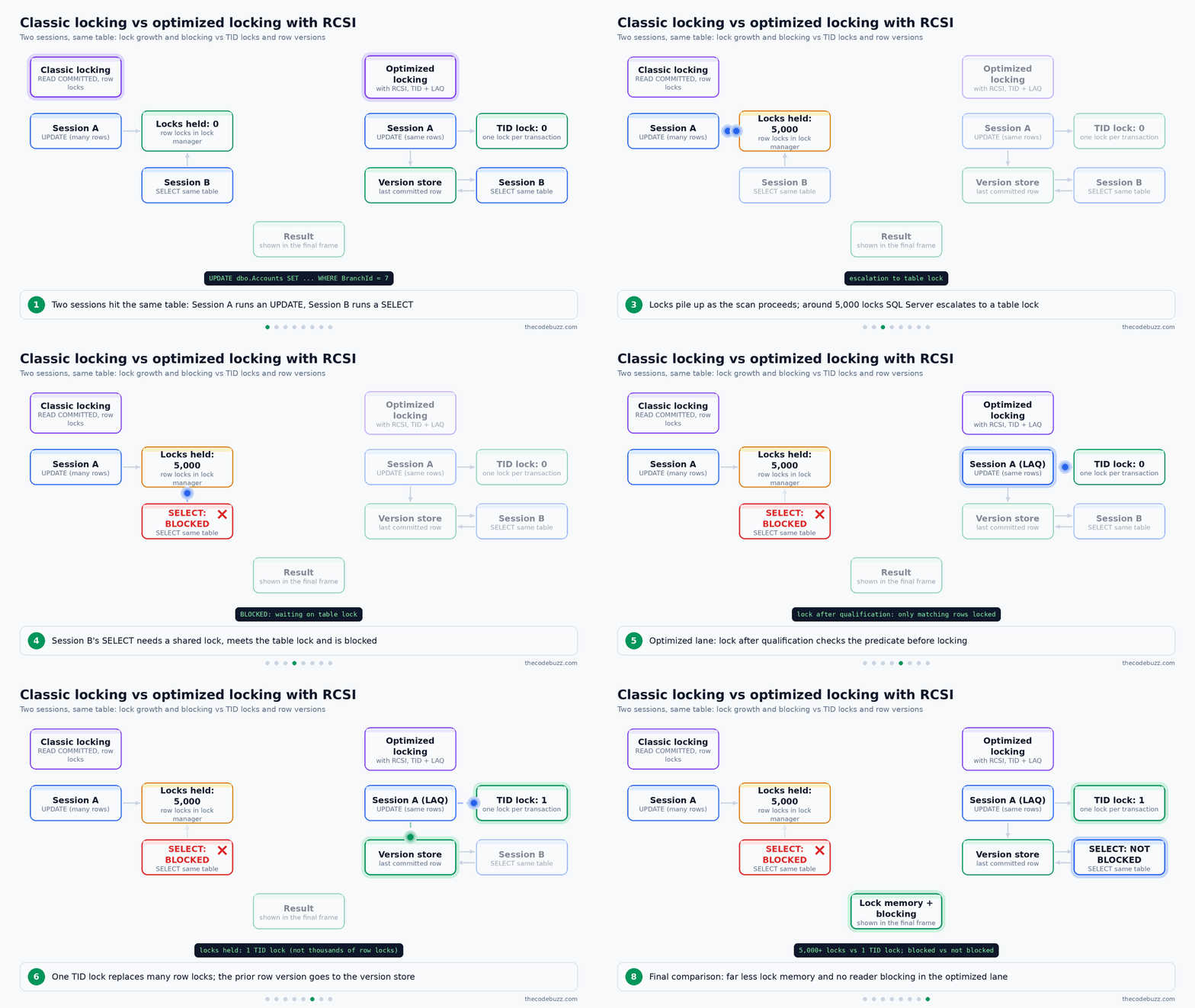
SQL Server 2025 adds optimized locking, which uses transaction ID (TID) locking and lock after qualification (LAQ). A TID lock replaces many row locks, and LAQ takes locks only on the rows that match the predicate. This reduces blocking and lock memory use, avoids lock escalation, and needs no application code change. It is a good reason to test 2025 with write-heavy workloads.
Optimized locking is not on by default for every database. It requires Accelerated Database Recovery (ADR) to be enabled on the database, so turn on ADR first and check the result in sys.databases. Confirm the exact database-level setting for optimized locking in the Microsoft documentation for your build.
T-SQL
-- Prerequisite for optimized locking: ADR on the database.
-- Test first and run in a quiet window.
ALTER DATABASE BankDb SET ACCELERATED_DATABASE_RECOVERY = ON;
GO

SELECT name, is_accelerated_database_recovery_on
FROM sys.databases
WHERE name = N'BankDb';
This enables ADR and confirms it with a check of is_accelerated_database_recovery_on.
RCSI and optimized locking address different parts of the blocking problem, so measure them with and without RCSI on your own workload instead of assuming the combination is better. The animated diagram below compares classic locking with optimized locking plus RCSI for two sessions on the same table.
Deadlocks and Retries
When SQL Server picks your session as a deadlock victim, it returns error 1205. Retry in application code with a bounded count (e.g. three attempts) and a short backoff. To see the cause, read the deadlock graph from the system_health Extended Events session.
Finance Transfer Example
Move money in one short transaction. Validate the inputs first, then update the two accounts with two separate statements, lowest ID first. Because every transfer takes the locks in the same order, two opposite transfers (A to B and B to A) can’t deadlock on these two rows.
The balance check sits inside the debit UPDATE‘s WHERE clause. The row is locked when the check runs, so it sees the current balance. A separate SELECT before the update could read an older row version under RCSI.
T-SQL
-- Enable RCSI (rolls back open transactions, so run in a quiet window)
ALTER DATABASE BankDb SET READ_COMMITTED_SNAPSHOT ON WITH ROLLBACK IMMEDIATE;
GO

CREATE OR ALTER PROCEDURE dbo.TransferFunds
    @FromId int, @ToId int, @Amount decimal(19,4)
AS
BEGIN
    SET NOCOUNT ON;
    SET XACT_ABORT ON;

    -- Validate inputs before opening a transaction
    IF @Amount IS NULL OR @Amount <= 0
        THROW 50001, 'Amount must be greater than zero.', 1;
    IF @FromId IS NULL OR @ToId IS NULL OR @FromId = @ToId
        THROW 50002, 'Source and target accounts must be different.', 1;

    -- Work out the lock order: lowest AccountId first
    DECLARE @LowId  int = CASE WHEN @FromId < @ToId THEN @FromId ELSE @ToId END;
    DECLARE @HighId int = CASE WHEN @FromId < @ToId THEN @ToId ELSE @FromId END;

    -- Signed change for each account: negative for the debit, positive for the credit
    DECLARE @LowDelta  decimal(19,4) = CASE WHEN @LowId  = @FromId THEN -@Amount ELSE @Amount END;
    DECLARE @HighDelta decimal(19,4) = CASE WHEN @HighId = @FromId THEN -@Amount ELSE @Amount END;

    BEGIN TRY
        BEGIN TRANSACTION;

        UPDATE dbo.Accounts
           SET Balance = Balance + @LowDelta
         WHERE AccountId = @LowId
           AND (@LowDelta > 0 OR Balance >= @Amount);
        IF @@ROWCOUNT = 0
            THROW 50003, 'Account not found or insufficient funds.', 1;

        UPDATE dbo.Accounts
           SET Balance = Balance + @HighDelta
         WHERE AccountId = @HighId
           AND (@HighDelta > 0 OR Balance >= @Amount);
        IF @@ROWCOUNT = 0
            THROW 50003, 'Account not found or insufficient funds.', 1;

        COMMIT TRANSACTION;
    END TRY
    BEGIN CATCH
        IF @@TRANCOUNT > 0 ROLLBACK TRANSACTION;
        THROW;
    END CATCH
END;
The procedure rejects zero, negative and NULL amounts, and it rejects a transfer from an account to itself. If either update finds no row to change, the transaction rolls back, so a failed debit never leaves a half-finished credit behind. XACT_ABORT ON also rolls back the whole transaction on any runtime error.
The fixed order only protects code that follows it. Any other procedure that updates the same accounts in a different order, or a trigger that touches other rows, can still deadlock with this one. Keep the retry logic for error 1205 in place.
Connection Management and Microsoft.Data.SqlClient Best Practices
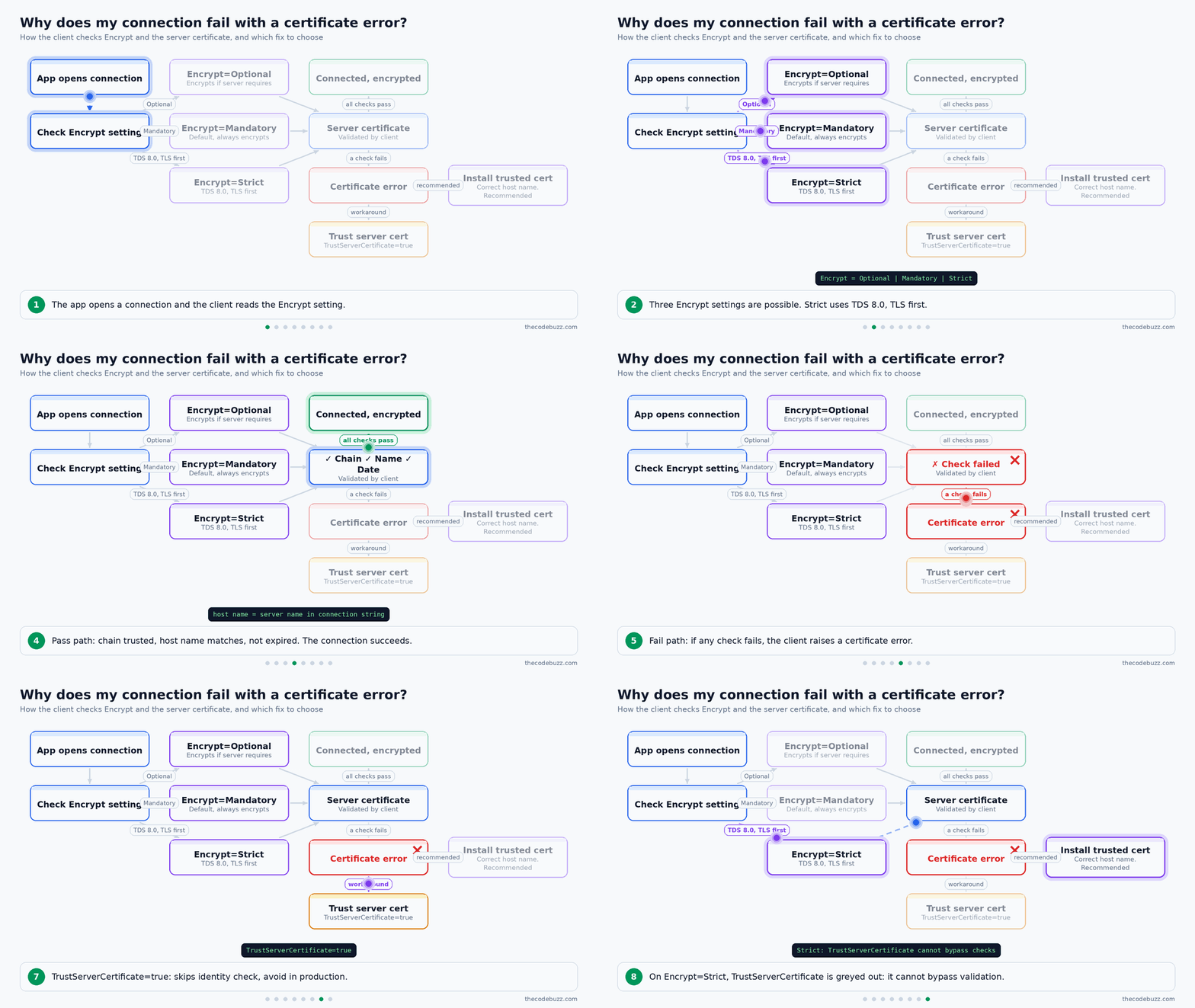
Use Microsoft.Data.SqlClient (v7.0.1 is shown in the current API docs) and keep the defaults Encrypt=Mandatory and TrustServerCertificate=false. When an app starts failing with certificate errors after a driver upgrade, the driver is not broken. The client simply does not trust the server certificate. Fix the certificate chain or the host name instead of switching on TrustServerCertificate. This is one of the most useful SQL Server best practices for developers.
The animated diagram below shows how the client decides whether a connection succeeds and which fix to choose.
Encrypt Options Compared
Encrypt=Strict uses TDS 8.0 and cannot be bypassed with TrustServerCertificate. Use it when your server supports TDS 8.0. Avoid TrustServerCertificate=true in production, because it skips the server identity check.
| Encrypt value | Behaviour | Certificate validation | Use when |
|---|---|---|---|
| Optional | Encrypts only if the server requires it | Only when encryption is used | Legacy apps during migration, not new work |
| Mandatory (default) | Always encrypts | Yes, unless TrustServerCertificate=true |
Most production apps |
| Strict | TDS 8.0, TLS first | Always, cannot be bypassed | Server supports TDS 8.0 |
Connection Pooling Rules
- Open late, close early: Use
usingorawait usingso the connection returns to the pool even when an exception occurs. - One connection per thread: A
SqlConnectionis not thread-safe, so never share it. - Keep connection strings identical: Each distinct string creates its own pool. Per-request values (e.g. a user name in the string) fragment the pool.
- Watch Max Pool Size: The default is 100. Pool exhaustion shows up as “timeout period elapsed prior to obtaining a connection from the pool”. The usual cause is a leaked connection, so look for missing disposal before raising the limit.
Availability Groups and Read-Only Routing
Connect to the availability group listener name, never a node name. Add MultiSubnetFailover=True when the listener spans subnets, so the client tries all IP addresses in parallel. Add ApplicationIntent=ReadOnly for reporting workloads that should use read-only routing.
C# Example: Strict Encryption and a Typed Parameter
Example: a retail app looks up orders for one customer. The parameter has an explicit type and size, which avoids implicit conversions and plan cache bloat.
C# (.NET)
using System.Data;
using Microsoft.Data.SqlClient;

var builder = new SqlConnectionStringBuilder
{
    DataSource = "orders-listener.contoso.com",
    InitialCatalog = "Sales",
    IntegratedSecurity = true,
    Encrypt = SqlConnectionEncryptOption.Strict,
    MultiSubnetFailover = true,
    ApplicationIntent = ApplicationIntent.ReadWrite,
    MaxPoolSize = 100
};

await using var connection = new SqlConnection(builder.ConnectionString);
await connection.OpenAsync();

await using var command = new SqlCommand(
    "SELECT OrderId, OrderDate FROM dbo.Orders WHERE CustomerRef = @CustomerRef;",
    connection);
command.Parameters.Add("@CustomerRef", SqlDbType.VarChar, 20).Value = "C-10045";

await using var reader = await command.ExecuteReaderAsync();
while (await reader.ReadAsync())
{
    Console.WriteLine($"{reader.GetInt32(0)} {reader.GetDateTime(1):d}");
}
This opens a strict, encrypted connection and returns it to the pool when the block ends.
For transient errors, the driver offers configurable retry logic (SqlRetryLogicOptions with SqlConfigurableRetryFactory). Assign a provider to the connection or command, and keep the retry count and delay bounded.
Python Equivalent with pyodbc
Use the ODBC Driver for SQL Server, set Encrypt=yes and TrustServerCertificate=no, and pass values through ? placeholders. Match the driver name to the one installed on your machine.
Python
import os
import pyodbc

conn_str = (
    "DRIVER={ODBC Driver 18 for SQL Server};"
    "SERVER=orders-listener.contoso.com;"
    "DATABASE=Sales;"
    f"UID={os.environ['SQL_USER']};PWD={os.environ['SQL_PASSWORD']};"
    "Encrypt=yes;TrustServerCertificate=no;"
    "MultiSubnetFailover=Yes;"
)

with pyodbc.connect(conn_str) as conn:
    cursor = conn.cursor()
    cursor.execute(
        "SELECT OrderId, OrderDate FROM dbo.Orders WHERE CustomerRef = ?",
        "C-10045",
    )
    for row in cursor.fetchall():
        print(row.OrderId, row.OrderDate)
This keeps the password out of the source code and sends the value as a parameter, not as part of the SQL text.
SQL Server Security Best Practices: Least Privilege, Injection and Encryption
Use Windows or Microsoft Entra authentication, give each application its own login with only the permissions it needs, and never connect an application as sa or as a member of db_owner. These SQL Server security best practices limit the damage if one credential or one query is compromised.
Apply the Least Privilege Pattern
Create a database role for the application, grant it EXECUTE on a schema, and give it no direct table access. Stored procedures and tables owned by the same principal use ownership chaining, so the procedure can read the tables even though the caller cannot.
| Permission model | Risk | Use |
|---|---|---|
db_owner |
Full control of the database, including dropping objects and changing permissions | DBAs and deployment accounts only |
db_datareader / db_datawriter |
Read or write every table, including future ones. An injection flaw exposes all data | Simple tools and trusted internal jobs |
Custom role with EXECUTE on a schema |
Limited to the procedures in that schema | Default for application connections |
T-SQL
CREATE LOGIN [CORP\svc-orders-app] FROM WINDOWS;
GO
USE OrdersDb;
GO
CREATE SCHEMA app AUTHORIZATION dbo;
GO
CREATE USER [CORP\svc-orders-app] FOR LOGIN [CORP\svc-orders-app];
CREATE ROLE app_orders_role;
GRANT EXECUTE ON SCHEMA::app TO app_orders_role;
ALTER ROLE app_orders_role ADD MEMBER [CORP\svc-orders-app];
This creates the login, the user, and a role that can only run procedures in the app schema.
Prevent SQL Injection in Dynamic SQL
Build dynamic SQL with parameters through sp_executesql and never concatenate user input into the query text. Microsoft guidance also says to review every piece of code that calls EXEC, EXECUTE or sp_executesql. Dynamic SQL also breaks ownership chaining, so the caller needs permissions on the underlying tables.
T-SQL
DECLARE @sql nvarchar(max) =
    N'SELECT OrderId, OrderDate, Total
      FROM dbo.Orders
      WHERE CustomerId = @CustomerId AND OrderDate >= @From;';

EXEC sys.sp_executesql
     @sql,
     N'@CustomerId int, @From date',
     @CustomerId = 42,
     @From = '2026-01-01';

-- Object names cannot be parameters, so quote them
DECLARE @table sysname = N'Orders';
SET @sql = N'SELECT COUNT(*) FROM dbo.' + QUOTENAME(@table) + N';';
EXEC sys.sp_executesql @sql;
Typed parameters also give you plan reuse. QUOTENAME is for object names only, and you should still check them against an allow-list.
Encrypt Data in Transit, at Rest and in Columns
- In transit: Use TLS with a valid server certificate. See the connection management section for
Encryptsettings. - At rest: Enable Transparent Data Encryption (TDE) to protect data files and backups from a stolen disk or file copy. TDE does not protect against a user who has permission to query the data.
- Sensitive columns: Use Always Encrypted when even DBAs should not read the values. The keys stay with the client.
- Backups: Encrypt them, and store the certificate or key separately. Without it, the backup cannot be restored.
Audit Activity and Reduce the Attack Surface
Use SQL Server Audit to write to a file or the Windows event log. Capture logins, permission changes and access to sensitive tables. Disable or rename sa if you don’t need it, and keep xp_cmdshell and other unused features turned off. This is a core item on any SQL Server DBA checklist.
Example: Patient Data in a Healthcare System
Give the reporting team a read-only role with column-level permissions, so identifying columns stay out of reach.
T-SQL
CREATE ROLE reporting_role;
GRANT SELECT ON dbo.Patient (PatientId, AdmissionDate, WardCode) TO reporting_role;
DENY  SELECT ON dbo.Patient (FullName, NationalId) TO reporting_role;
Dynamic data masking can hide values in query results, but it is a convenience and not a security boundary. A user who can filter or infer values can still work around it, so rely on permissions and encryption.
SQL Server Backup Best Practices, High Availability and Restore Testing
A backup is only proven when you have restored it. Match the recovery model to your recovery point objective (RPO, the amount of data loss you can accept), take full, differential and log backups, keep copies off the server, and test restores on a schedule. These are the core SQL Server backup best practices.
Choose a Backup Strategy That Matches Your RPO and RTO
The recovery model decides which backups are possible. RTO means recovery time objective, the time you can afford to be down.
| Strategy | RPO | RTO | Log growth risk |
|---|---|---|---|
| Full only (SIMPLE recovery) | Back to the last full backup | Short, one restore | Low, the log is reused automatically |
| Full + differential (SIMPLE) | Back to the last differential | Short, two restores | Low |
| Full + differential + log (FULL recovery) | Minutes, set by log backup interval | Longer, a full chain plus point-in-time options | High if log backups stop |
In FULL recovery, SQL Server keeps log records until a log backup has captured them. With no log backups, the log cannot be reused, so it grows until the disk is full. Switch to SIMPLE if you do not need point-in-time recovery.
Example: a retail orders database takes a full backup nightly, a differential every four hours and a log backup every 10 minutes. That gives an example RPO of about 10 minutes. It is an illustration, not a recommendation, so set your own interval from business needs.
Use CHECKSUM, Compression and Encryption on Every Backup
CHECKSUM detects page corruption while the backup runs. Compression reduces size and I/O. Encryption protects the file once it leaves the server.
RESTORE VERIFYONLY is the minimum check. It confirms the backup is readable, but it does not prove the data is consistent. Only a real restore followed by DBCC CHECKDB on the restored copy does that.
ZSTD Compression and Secondary Backups in SQL Server 2025
ZSTD backup compression is GA in SQL Server 2025 but is not the default. Enable it per backup with COMPRESSION (ALGORITHM = ZSTD, LEVEL = LOW | MEDIUM | HIGH), or instance-wide by setting backup compression algorithm to 3 with sp_configure. Test CPU cost and backup time first, because HIGH can take much longer.
Full, differential and log backups can now run on availability group secondary replicas (GA), which takes load off the primary. Backups to immutable storage are also GA, which helps against ransomware.
The animated diagram below shows the full path from backup to a verified restore.

High Availability Is Not a Backup
An availability group replicates a bad DELETE or corruption to the secondary just as quickly. Use HA for uptime and backups for recovery.
| Option | Scope | Failover | Readable secondary | Typical use |
|---|---|---|---|---|
| Always On availability group | Database(s) | Automatic or manual | Yes | HA, read offload, backups on secondary |
| Failover cluster instance | Whole instance | Automatic, shared storage | No | Instance-level HA, jobs and logins included |
| Log shipping | Database | Manual | Optional, in standby mode | Simple DR to another site |
Protect Copies, Credentials and Keys
Keep one copy on a local share for fast restores and one offsite or on immutable storage. Document the backup credential, certificate and private key, and store them separately from the backups. If you lose the certificate, encrypted backups cannot be read.
Backup and Restore Test Script
The script below backs up, restores to a test name with MOVE, and checks consistency. The test server needs the same certificate. Run RESTORE FILELISTONLY first to get the logical file names.
SQL (T-SQL)
-- Optional: make ZSTD the instance default (SQL Server 2025)
EXEC sp_configure 'backup compression algorithm', 3;
RECONFIGURE;

BACKUP DATABASE SalesDB
TO DISK = N'D:\Backup\SalesDB_full.bak'
WITH CHECKSUM,
     COMPRESSION (ALGORITHM = ZSTD, LEVEL = MEDIUM),
     ENCRYPTION (ALGORITHM = AES_256, SERVER CERTIFICATE = BackupCert),
     STATS = 10;

BACKUP LOG SalesDB
TO DISK = N'D:\Backup\SalesDB_log.trn'
WITH CHECKSUM,
     COMPRESSION (ALGORITHM = ZSTD, LEVEL = LOW),
     ENCRYPTION (ALGORITHM = AES_256, SERVER CERTIFICATE = BackupCert);

-- On the restore test server
RESTORE FILELISTONLY FROM DISK = N'D:\Backup\SalesDB_full.bak';

RESTORE DATABASE SalesDB_RestoreTest
FROM DISK = N'D:\Backup\SalesDB_full.bak'
WITH MOVE N'SalesDB'     TO N'E:\RestoreTest\SalesDB_RestoreTest.mdf',
     MOVE N'SalesDB_log' TO N'F:\RestoreTest\SalesDB_RestoreTest.ldf',
     CHECKSUM, RECOVERY, STATS = 10;

DBCC CHECKDB (SalesDB_RestoreTest) WITH NO_INFOMSGS, ALL_ERRORMSGS;
This restores the full backup under a new name and reports any corruption. Record how long the restore took, because that is your measured RTO.
For a point-in-time restore, restore the full backup (and the latest differential) with NORECOVERY. Then restore each log backup, and add STOPAT = '2026-10-13T09:55:00' to the last one with RECOVERY. This needs FULL recovery and an unbroken log chain.
Monitoring SQL Server: Wait Stats, Extended Events and Performance Counters
Start with wait statistics to see what the instance is waiting on. Then use Query Store and Extended Events to find the queries and events behind those waits. This order is the core of SQL Server performance tuning best practices, because it stops you from guessing.
Common Wait Types and What They Point To
A wait type is the reason a request had to pause. Treat it as a pointer, not a diagnosis. Confirm it with a query, a plan or a counter before you change anything.
| Wait | Usually points to |
|---|---|
PAGEIOLATCH_* |
Slow data storage or memory pressure |
LCK_M_* |
Blocking between sessions |
WRITELOG |
Slow transaction log storage |
CXPACKET / CXCONSUMER |
Parallelism (check MAXDOP and cost threshold) |
RESOURCE_SEMAPHORE |
Queries waiting for memory grants |
T-SQL
SELECT TOP (10)
       wait_type,
       waiting_tasks_count,
       wait_time_ms,
       signal_wait_time_ms,
       CAST(100.0 * wait_time_ms / SUM(wait_time_ms) OVER () AS decimal(5,2)) AS pct_of_waits
FROM sys.dm_os_wait_stats
WHERE wait_time_ms > 0
  AND wait_type NOT IN (N'SLEEP_TASK', N'LAZYWRITER_SLEEP', N'XE_TIMER_EVENT',
      N'XE_DISPATCHER_WAIT', N'REQUEST_FOR_DEADLOCK_SEARCH', N'CHECKPOINT_QUEUE',
      N'DIRTY_PAGE_POLL', N'LOGMGR_QUEUE', N'SQLTRACE_INCREMENTAL_FLUSH_SLEEP',
      N'SP_SERVER_DIAGNOSTICS_SLEEP', N'BROKER_TO_FLUSH', N'BROKER_TASK_STOP',
      N'QDS_PERSIST_TASK_MAIN_LOOP_SLEEP', N'QDS_ASYNC_QUEUE', N'WAITFOR')
ORDER BY wait_time_ms DESC;
This returns the top waits since the last restart, minus a partial list of idle waits. Take two snapshots and compare them to see current behaviour.
Use Extended Events, Not Profiler
Extended Events is the lightweight tracing system, and SQL Trace and Profiler are deprecated. Keep the built-in system_health session running for deadlock graphs. Add a small session for slow statements.
T-SQL
CREATE EVENT SESSION [LongRunningStatements] ON SERVER
ADD EVENT sqlserver.sql_statement_completed
(
    ACTION (sqlserver.database_name, sqlserver.client_app_name, sqlserver.sql_text)
    WHERE duration > 1000000   -- microseconds, so 1 second
)
ADD TARGET package0.event_file
(
    SET filename = N'LongRunningStatements.xel', max_file_size = 50, max_rollover_files = 4
)
WITH (MAX_DISPATCH_LATENCY = 30 SECONDS, STARTUP_STATE = ON);

ALTER EVENT SESSION [LongRunningStatements] ON SERVER STATE = START;
The file target rolls over at a fixed size, so the session cannot fill the disk.
Counters and Alerts Worth Setting Up
- Page life expectancy: Watch the trend against your own baseline. A fixed number such as 300 does not fit every server.
- Batch requests per second: Use it to read load changes next to waits.
- Log file percent used: Alert before the log fills the volume.
- Free space: Check data, log and tempdb volumes separately.
- AG synchronization lag: Alert when secondaries fall behind.
- Errors and jobs: Alert on severity 17 to 25 errors and on job failures.
For backups, alert on the age of the last successful backup, not on whether the job ran. A job can finish without producing a usable backup. This also belongs on any SQL Server DBA checklist.
Patching and Upgrading to SQL Server 2025: What to Check First
Patch on a regular cadence, test the upgrade on a copy that has the same linked servers, certificates and jobs, and plan the outage window before you start. Most upgrade surprises come from things outside the database files.
Version, Support and Current Builds
| Version | Mainstream support | Extended support | Latest build (October 2026) |
|---|---|---|---|
| SQL Server 2019 | Ended 28 February 2025 | Until 8 January 2030 | CU32 15.0.4430.1; CU32+GDR 15.0.4490.9 |
| SQL Server 2022 | Ends 11 January 2028 | Check the Microsoft lifecycle page for the end date | CU27 16.0.4295.3 |
| SQL Server 2025 (GA 18 November 2025, RTM 17.0.1000.7) | Ends 6 January 2031 | Check the Microsoft lifecycle page for the end date | CU9 17.0.5005.3 (15 September 2026); GDR 17.0.1135.8; CU8+GDR 17.0.4085.5 |
A CU (cumulative update) carries fixes and features. A GDR (General Distribution Release) carries security-only fixes for servers that don’t apply CUs. Each instance sits on one of two tracks, and the rule is one-way.
- GDR track: the instance has only had GDR updates and receives security fixes only (e.g., 17.0.1135.8 for SQL Server 2025).
- CU track: the instance has had at least one CU. From here, security-only fixes arrive as a CU+GDR package built on the CU you already have (e.g., CU8+GDR 17.0.4085.5).
- Moving from GDR to CU is allowed. Install a CU and the instance joins the CU track.
- Moving from CU back to GDR is not allowed. Once a CU is installed, only CU and CU+GDR packages apply.
Decide the track before the first patch. If you may want bug fixes or features later, plan to move to the CU track once and stay there. If you only want security fixes, stay on GDR until you are ready to commit to CUs.
T-SQL
SELECT SERVERPROPERTY('ProductVersion') AS ProductVersion,
       SERVERPROPERTY('ProductLevel')   AS ProductLevel,
       SERVERPROPERTY('Edition')        AS Edition;
Compare the returned build number with the table above to see which track and update level the instance is on.
Is the Upgrade Worth It?
Yes for write-heavy or backup-heavy systems, after testing. The practical 2025 gains are:
- Optimized locking, which uses transaction ID (TID) locking and lock after qualification (LAQ) to reduce blocking and lock memory, and to avoid lock escalation, with no application code changes.
- Query Store on readable secondaries, on by default (in 2022 it was off by default and needed trace flag 12606).
- ZSTD backup compression and backups on AG secondaries.
- Resource Governor and higher limits in Standard edition.
- tempdb space governance.
The trade-off is testing effort. DiskANN vector indexes are preview only, so keep them out of production.
What Breaks: Linked Servers and TLS
A DBA report found that linked servers using SQLNCLI or MSOLEDBSQL can fail after an in-place upgrade to 2025, because of stricter TLS certificate validation. Setup can also restart the service up to three times, so the outage is longer than one restart. Fix the certificates or the provider settings before cutover, then test every linked server afterwards.
T-SQL
DECLARE @name sysname;
DECLARE ls CURSOR FAST_FORWARD FOR
    SELECT name FROM sys.servers WHERE is_linked = 1;
OPEN ls;
FETCH NEXT FROM ls INTO @name;
WHILE @@FETCH_STATUS = 0
BEGIN
    BEGIN TRY
        EXEC sp_testlinkedserver @name;
        PRINT @name + ': OK';
    END TRY
    BEGIN CATCH
        PRINT @name + ': FAILED - ' + ERROR_MESSAGE();
    END CATCH;
    FETCH NEXT FROM ls INTO @name;
END;
CLOSE ls;
DEALLOCATE ls;
The animated diagram below shows the safe order of steps, including the retry loop for failed linked server tests.
In-Place vs Side-by-Side Migration
| Approach | Rollback | Downtime | Effort |
|---|---|---|---|
| In-place | Hard; restore the old setup from backups | Longer (service restarts during Setup) | Low |
| Side-by-side (backup/restore or log shipping cutover) | Easy; old server stays intact | Short, limited to the cutover | Higher |
Use side-by-side for critical systems. Use in-place only for small or non-critical instances where a longer window is acceptable.
After the Upgrade: Compatibility Level
Keep the old compatibility level until the application is tested. Let Query Store capture baseline plans, then raise the level and force back any plan that regressed.
The level used below, 170 for SQL Server 2025, is not in the verified research for this article. Confirm it in the Microsoft documentation article “ALTER DATABASE compatibility level (Transact-SQL)” before you run the statement, and use the highest level that article lists for your version.
T-SQL
-- Check the current level
SELECT name, compatibility_level FROM sys.databases WHERE name = N'SalesDb';

-- Raise it after testing. Replace 170 if the Microsoft docs list a different
-- level for your SQL Server 2025 build.
ALTER DATABASE SalesDb SET COMPATIBILITY_LEVEL = 170;
Common Anti-Patterns and SQL Server DBA Production Readiness Checklist
Most production incidents trace back to a small set of repeated mistakes. Use the table below to spot them, then run the checklist before a server goes live.
Common SQL Server Anti-Patterns
| Anti-pattern | Symptom | Fix |
|---|---|---|
Default max server memory |
OS paging, memory pressure on the instance | Cap it, starting near 75% of available memory |
| MAXDOP 1 everywhere, or default 0 on a large NUMA box | Slow reports and index builds, or heavy parallel waits | Start from the NUMA-based guidance, scope per database |
| Cost threshold left at 5 | Tiny queries going parallel | Raise it from observed plan costs, then check CXPACKET/CXCONSUMER |
| Single tempdb file, small autogrow steps | PAGELATCH contention, pauses during growth | Equally sized, pre-sized files with fixed growth |
Clustered key on NEWID() GUID |
Page splits, fragmentation | Use an ever-increasing key or NEWSEQUENTIALID |
Functions on indexed columns in WHERE |
Index scans instead of seeks | Rewrite as SARGable range predicates |
SELECT * |
Extra I/O, covering indexes unused | List only the needed columns |
| String-built dynamic SQL | Injection risk, plan cache bloat | Use sp_executesql with typed parameters |
Apps connecting as sa or db_owner |
Large blast radius after a compromise | Custom role with EXECUTE on a schema |
TrustServerCertificate=true in production |
No server identity check | Fix the certificate chain and host name |
| FULL recovery with no log backups | Log file grows until the disk fills | Schedule log backups, or use SIMPLE if the RPO allows |
| Backups never restored | Surprise failure at recovery time | Scheduled test restore plus DBCC CHECKDB |
| Linked servers not tested after upgrade | Failures after cutover | Run sp_testlinkedserver on a copy first |
SQL Server Production Readiness Checklist
This SQL Server DBA checklist combines the configuration, security and backup rules from the sections above. Work through it in order.
- Confirm the version and patch level, and choose the CU or GDR track on purpose.
- Set the SQL Server max server memory setting to a specific value, with
min server memoryat 0. - Set MAXDOP and cost threshold for parallelism from the NUMA rule and measured plan costs.
- Lay out tempdb with equally sized, pre-sized files on fast storage.
- Separate data, log and tempdb volumes where the storage design allows.
- Enable instant file initialization for data files.
- Enable Query Store on user databases with a sensible size and capture mode.
- Choose the isolation level deliberately, and test RCSI before turning it on.
- Set connection strings with
Encrypt, the listener name andMultiSubnetFailover=Truewhere it applies. - Create least-privilege roles for each application, and disable or rename
sa. - Enforce TLS in transit and enable TDE at rest.
- Turn on SQL Server Audit for logins, permission changes and sensitive tables.
- Schedule full, differential and log backups with
CHECKSUM, compression and encryption. - Keep an offsite or immutable copy, and document backup keys and certificates.
- Restore on a schedule and run
DBCC CHECKDBon the restored copy. - Alert on wait trends, failed jobs, severity 17-25 errors and the age of the last good backup.
- Write the upgrade plan, including linked server tests and the outage window.
These items also form a short SQL Server security best practices review (items 10 to 12) and a SQL Server backup best practices review (items 13 to 15).
Key takeaways
- Cap max server memory: Start from about 75% of the memory that is available to SQL Server (after other processes and other instances), keep min server memory at 0, and always use a specific value if Lock Pages in Memory is granted.
- Tune MAXDOP and cost threshold by measurement: Begin with the Microsoft NUMA-based MAXDOP guidance, use database-scoped MAXDOP or Resource Governor for exceptions, and raise cost threshold for parallelism above the default of 5 after checking CXPACKET/CXCONSUMER waits.
- Use Strict or Mandatory encryption with a valid certificate: Fix the certificate chain or host name when connections fail after a driver upgrade. Avoid
TrustServerCertificate=truein production. - Give applications least privilege: Use a dedicated login and a role with EXECUTE on a schema, never
saordb_owner, and pass every value through typed parameters. - Enable Query Store: Turn it on for every database you care about, so you can find regressions, force a known good plan, and keep baseline plans before a compatibility level change.
- Test restores, not just backups: Take backups with CHECKSUM, keep an offsite or immutable copy, and restore to a test name regularly, then run DBCC CHECKDB on the restored copy.
- Test the SQL Server 2025 upgrade on a copy first: Include linked servers, certificates and jobs, and run
sp_testlinkedserverafterwards because stricter TLS validation can break them. Evaluate optimized locking with RCSI for write-heavy workloads, and keep DiskANN vector indexes out of production while they are preview only.
That’s all! Happy coding!
Did this guide help you to set up and tune SQL Server for production? Please share your questions or experience in the comments below.
Bookmark this page for your next production review and share it with your team. Subscribe to TheCodeBuzz to get new database best-practice guides in your inbox.
FAQ
What should I set max server memory to in SQL Server?
Start with about 75% of the memory that is available to the instance, meaning the total minus what the OS, other instances and other processes use, and leave min server memory at 0. The default is about 2 TB, which is effectively unlimited, so you should cap it on every version. If Lock Pages in Memory is granted to the service account, you must set a specific value, not the default. Set it with sp_configure 'max server memory (MB)' followed by RECONFIGURE, and check the result in sys.configurations.
What is the best MAXDOP and cost threshold for parallelism setting?
There is no single best value. Start from Microsoft’s NUMA-based MAXDOP guidance, set it per database with ALTER DATABASE SCOPED CONFIGURATION SET MAXDOP for mixed workloads, and use Resource Governor workload groups where one workload needs a different limit. Avoid MAXDOP 1 server-wide, because it breaks parallel index builds and slows reporting queries. The cost threshold for parallelism defaults to 5, which is too low for modern hardware, so raise it based on observed plan costs and check the effect on CXPACKET and CXCONSUMER waits.
How many tempdb files should I have, and how should I size them?
Start with a small number of equally sized data files, up to the number of cores as Microsoft guidance suggests, and add more only if monitoring shows allocation contention. Pre-size the files and use a fixed growth increment, so autogrow stays an emergency measure and not a routine event. Equal sizes matter because SQL Server spreads allocations across files, and uneven files lead to uneven use. On SQL Server 2025 you can also use Resource Governor tempdb space governance, which stops a workload with an error when it exceeds its limit.
Why does my app fail to connect after upgrading Microsoft.Data.SqlClient, with certificate errors?
The driver now defaults to Encrypt=Mandatory and TrustServerCertificate=false, so it rejects a server certificate that the client does not trust. This is not a driver bug. Fix the certificate chain or make sure the host name in the connection string matches the certificate, instead of switching on TrustServerCertificate=true, which skips server identity checks. Use Encrypt=Strict where the server supports TDS 8.0, because Strict cannot be bypassed with TrustServerCertificate.
Should I enable Query Store, optimized locking or Read Committed Snapshot Isolation?
Yes to Query Store on every user database you care about, because it helps you find regressions and force a known good plan. Enable Read Committed Snapshot Isolation (RCSI) after testing, since it adds version storage and changes behavior for code that relied on blocking reads. Optimized locking comes with SQL Server 2025 and needs no application code changes. It works best together with RCSI, so it is a good reason to test 2025 for heavy write workloads.
Sources and further reading
- What’s New in SQL Server 2025 – SQL Server (Microsoft Learn)
- Latest Updates and Version History for SQL Server (Microsoft Learn)
- Server Memory Configuration Options – SQL Server (Microsoft Learn)
- Memory Management Architecture Guide – SQL Server (Microsoft Learn)
- Resource Governor – SQL Server (Microsoft Learn)
- SQL Server Security Best Practices – SQL Server (Microsoft Learn)
- Encryption and Certificate Validation in Microsoft.Data.SqlClient (Microsoft Learn)
- Whats new in the Backup/Restore area in SQL Server 2025 (Microsoft Tech Community)
- SQL Server 2025 New Features and Enhancements (MSSQLTips)
- SQL Server 2025 Backup Compression Algorithm (SQLServerCentral)
Diagrams are original illustrations created by and for TheCodeBuzz.