In our last article, we learned MongoDB specific guidelines. Today in this article , we will learn about PostgreSQL.
Most PostgreSQL outages and security incidents come from clusters that were never patched or never upgraded, not from exotic bugs. This guide is for engineers, architects and DBAs who run PostgreSQL in production. It is a compact reference you can bookmark and check a cluster against.
Here is where things stand in October 2026. PostgreSQL 18 is the current stable major, and 18.6, dated 2026-08-13, is its latest minor. PostgreSQL 14 receives its last fixes on 2026-11-12, so anyone still on it has a deadline measured in weeks. I cover patching and upgrades first, because that is where most production risk sits.
After that come the PostgreSQL 18 features that change how you design schemas and indexes, with the reasoning behind each rule so you can judge where it applies to your workload. These PostgreSQL best practices start with a summary table and end with a checklist and FAQ.
Version note: this guide targets PostgreSQL 18 (18.6), and also covers 17.11, 16.15, 15.19 and 14.24 for patching and upgrade planning, with PostgreSQL 19 Beta 4 mentioned only for testing.
PostgreSQL best practices at a glance
| Area | Do this | Avoid this |
|---|---|---|
| Patching | Run the latest minor of your major: 18.6, 17.11, 16.15, 15.19 or 14.24. Minors contain only bug and security fixes, so they are low-risk, but still test them in staging first. They need a restart. | Pinning old minors. 18.1 fixed CVE-2025-12817 and 18.4 fixed CVE-2026-6575. |
| Versions | Run a supported major. PostgreSQL 14 receives its last fixes on November 12, 2026, so plan that upgrade now. Test your workload against PostgreSQL 19 Beta 4 in a non-production environment. | Running any beta in production, or staying on 14 after its end of support. |
| Backups and PITR | Take regular base backups and archive WAL continuously (archive_mode plus an archive command or library that reports failures). Rehearse restores to a chosen point in time, and monitor archive lag. |
Relying on pg_dump alone for large production systems, or keeping backups you have never restored. |
| Replication and failover | Run at least one streaming standby in another failure domain. Use tested, automated failover tooling with fencing of the old primary. Choose synchronous_commit and synchronous standbys deliberately, based on how much data loss you can accept. |
Untested manual failover, and abandoned replication slots that make the primary retain WAL until the disk fills. |
| Autovacuum and bloat | Keep autovacuum on. Tune per-table thresholds on hot, high-churn tables. Watch dead tuples, table and index size, and the oldest open transaction. | Disabling autovacuum, or leaving sessions idle in a transaction, which stops cleanup of dead rows. |
| Connection pooling | Put a pooler such as PgBouncer in front of the database and keep server-side connections to a small, measured number. | Thousands of direct application connections. Also avoid transaction-mode pooling with session state (session-level SET, advisory locks) without checking compatibility. |
Memory and max_connections |
Start shared_buffers at roughly a quarter of RAM and adjust from measurements. Size work_mem against the worst-case number of concurrent sorts and hashes. Keep max_connections modest and rely on the pooler. |
Raising max_connections to hide pool exhaustion, or a large global work_mem multiplied across many sessions. |
| TLS and SCRAM | Set password_encryption = scram-sha-256. Enable ssl and use hostssl lines in pg_hba.conf with scram-sha-256. |
trust rules, unencrypted remote connections and legacy md5 hashes. |
| Authentication | Where you have an identity provider, configure OAuth in pg_hba.conf and load validators with oauth_validator_libraries. |
Shared static passwords. |
| Monitoring | Load pg_stat_statements through shared_preload_libraries. Set log_min_duration_statement to a threshold that fits your workload and enable log_lock_waits. Alert on replication lag, archive failures, disk space and connection saturation. |
Logging every statement permanently, or finding slow queries only after users report them. |
| Primary keys | Use uuidv7() for timestamp-ordered keys. |
Random UUIDs as keys on large B-tree indexes, because of poor locality. |
| Composite indexes | Order columns for your main queries. PostgreSQL 18 skip scan lets a query omit an equality condition on leading columns. It helps most when the omitted leading column has few distinct values. Confirm with EXPLAIN. |
Dropping or reordering existing indexes because skip scan exists, or adding redundant indexes without checking plans. |
| Integrity | Use WITHOUT OVERLAPS and PERIOD temporal constraints. |
Application-side overlap checks. |
| Storage | Keep data checksums, which initdb enables by default in 18. When upgrading a cluster that has none, pg_upgrade needs matching settings, so initialize the new cluster with --no-data-checksums. |
Turning checksums off without a reason. |
| I/O | Use 18 async I/O (io_method) for reads. Inspect pg_aios. Benchmark on your own storage before changing the default. |
Changing io_method on assumptions. |
Minor releases contain only bug and security fixes, which is why they are low-risk to apply. Low-risk is not no-risk: read the release notes, test against your workload and schedule the restart. The CVE examples above show why you should not defer them for long.
Key order matters because a B-tree keeps neighbouring values on neighbouring pages. Time-ordered keys append to the right edge of the index, while random keys touch pages all over it, which hurts cache hit rates on large tables.
Skip scan changes the column-order trade-off but does not remove it. PostgreSQL has to probe the index once for each distinct value of the omitted leading column. With a handful of values that is cheap.
With millions of values it is not, and an index that leads with the column you actually filter on is still the better choice. Check the plan before you change any existing index.
Example: uuidv7 key, temporal constraint and a skip scan candidate
SQL
CREATE EXTENSION IF NOT EXISTS btree_gist;

CREATE TABLE room_booking (
    booking_id uuid NOT NULL DEFAULT uuidv7() PRIMARY KEY,
    tenant_id  integer NOT NULL,
    room_id    integer NOT NULL,
    status     text NOT NULL,   -- few distinct values, for example 'confirmed' or 'cancelled'
    during     tstzrange NOT NULL,
    CONSTRAINT no_double_booking
        UNIQUE (room_id, during WITHOUT OVERLAPS)
);

-- Leading column has few distinct values; queries may filter on tenant_id alone.
CREATE INDEX room_booking_status_tenant_idx
    ON room_booking (status, tenant_id);
The scalar room_id in the temporal key needs btree_gist. The range column during is what the constraint checks for overlap. The index behind that constraint also starts with room_id, so lookups by room already have an index and you do not need to add another.
The (status, tenant_id) index is the skip scan candidate. The query below has an equality condition on tenant_id but none on the leading column status. Before PostgreSQL 18, this index could not serve it efficiently. Run it against representative data after an ANALYZE. On a tiny table the planner may prefer a sequential scan, so the SET LOCAL line is for testing only and shows whether the index is usable at all.
SQL
ANALYZE room_booking;

BEGIN;
SET LOCAL enable_seqscan = off;   -- test only: see whether the index can serve the query

EXPLAIN (ANALYZE, BUFFERS)
SELECT booking_id
FROM room_booking
WHERE tenant_id = 42;

ROLLBACK;
In the plan, look for a scan on room_booking_status_tenant_idx with tenant_id = 42 as the index condition, even though the query never mentions status.
PostgreSQL 18 also reports the number of index searches in EXPLAIN ANALYZE. A skip scan shows roughly one search per distinct status value.
Then rerun the query without the SET LOCAL line and compare timing and buffer counts with the plan the planner picks on its own. If the planner chooses a sequential scan or another index and is faster, keep that plan. If status has many distinct values in your data, a separate index on (tenant_id) is the better design.
Plan upgrades and the production readiness checklist
Support lifecycle
PostgreSQL ships a major version about once a year and supports each for five years. PostgreSQL 18 was first released on 2025-09-25, and its final release is due 2030-11-14. PostgreSQL 14 stops receiving fixes on 2026-11-12, so schedule that move now. Since version 10, minors increment the second number (18.5 to 18.6).
Minor releases carry only bug and security fixes, so they are low-risk to apply, but not zero-risk. Test them in staging and keep a rollback plan. Apply them promptly. Release 18.1 fixed CVE-2025-12817, where CREATE STATISTICS skipped a schema CREATE privilege check.
Release 18.4 fixed CVE-2026-6575 in pg_restore_attribute_stats along with more than 60 bugs. As of early October 2026 the newest minors are 18.6, 17.11, 16.15, 15.19 and 14.24, all dated 2026-08-13.
PostgreSQL 19 is in beta (Beta 4 was announced on 2026-09-24). Do not run it in production, but do test your own workloads against it so you find regressions early.
Upgrading with pg_upgrade
PostgreSQL 18 keeps planner statistics across the upgrade, runs checks in parallel with --jobs, and adds --swap, which swaps directories instead of copying, cloning or linking. The animated diagram below walks through this path.
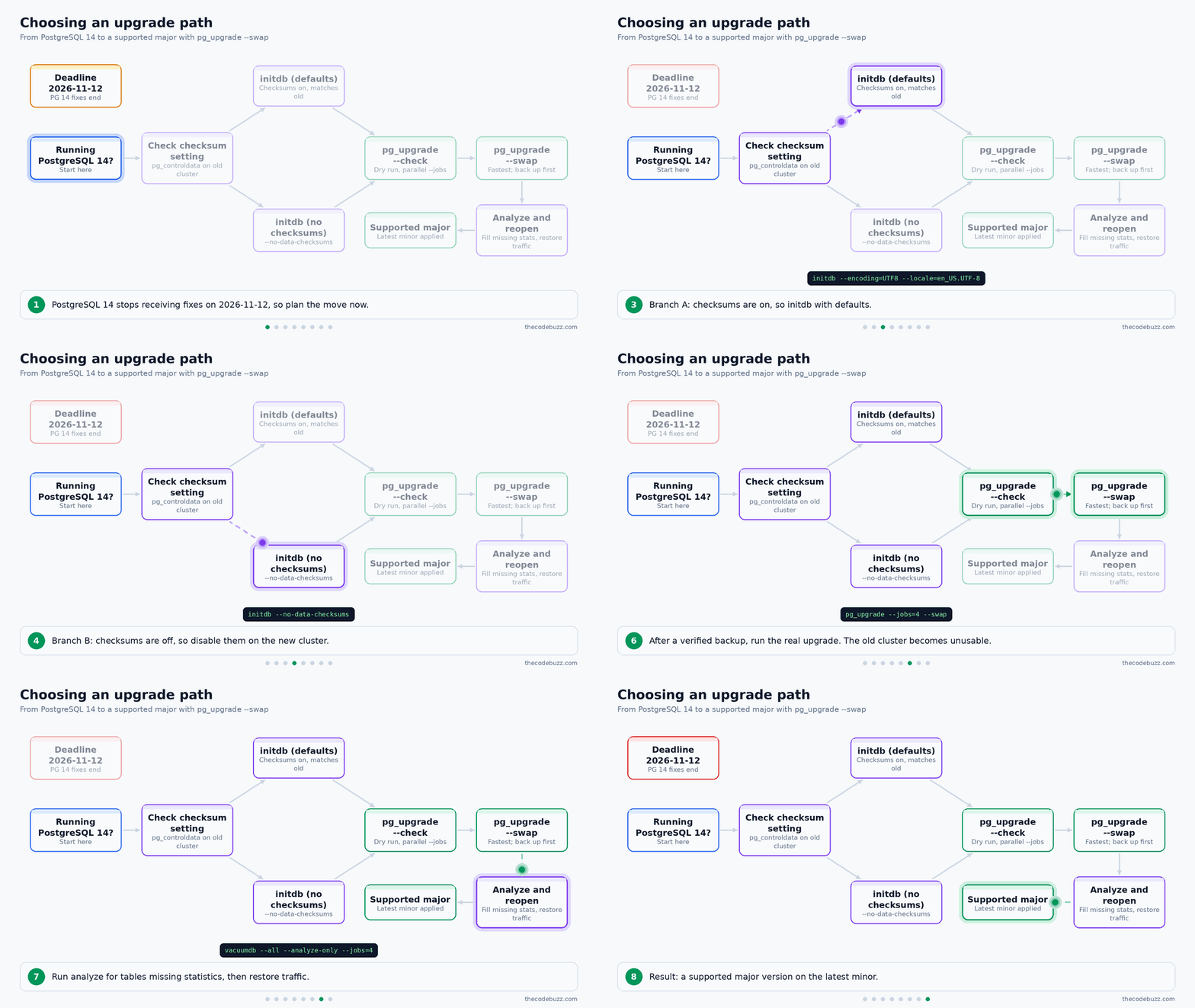
Four rules govern the new cluster and the run itself:
- Compatible encoding and locale. Initialise the new cluster with an encoding and locale that match the old one.
pg_upgraderefuses to proceed if they differ. Read the old values first and pass them toinitdbexplicitly rather than relying on the environment. - Matching checksum settings.
initdbin PostgreSQL 18 enables data checksums by default, andpg_upgraderequires both clusters to agree. If the old cluster has none, create the new one with--no-data-checksums. You can enable checksums later, offline, withpg_checksums --enablewhile the cluster is cleanly shut down. It rewrites every data file, so plan the window. - Run as the
postgresuser. Runinitdbandpg_upgradeas the operating-system user that owns the data directories, normallypostgres. Running as root, or as a different user, causes permission failures or leaves files with the wrong owner. --swapleaves the old cluster unusable. It reuses the old cluster’s files instead of copying them, so you cannot start the old cluster afterwards. Your rollback is the backup you took before the upgrade, so confirm it restores before you begin.
SQL
-- Run on the OLD cluster: encoding and locale to reuse for initdb
SELECT datname,
       pg_encoding_to_char(encoding) AS encoding,
       datcollate,
       datctype
FROM pg_database
WHERE datname NOT IN ('template0', 'template1');
Bash/shell
# Run everything as the postgres user
sudo -iu postgres

# Does the old cluster use checksums?
pg_controldata -D /var/lib/postgresql/14/main | grep -i checksum

# New cluster: match encoding and locale from the query above.
# Add --no-data-checksums ONLY if the old cluster has no checksums.
/usr/lib/postgresql/18/bin/initdb \
  --encoding=UTF8 --locale=en_US.UTF-8 \
  --no-data-checksums \
  -D /var/lib/postgresql/18/main

# Dry run: checks only, changes nothing
/usr/lib/postgresql/18/bin/pg_upgrade --check --jobs=4 \
  -b /usr/lib/postgresql/14/bin -B /usr/lib/postgresql/18/bin \
  -d /var/lib/postgresql/14/main -D /var/lib/postgresql/18/main

# Real run, after a verified backup. The old cluster is unusable afterwards.
/usr/lib/postgresql/18/bin/pg_upgrade --jobs=4 --swap \
  -b /usr/lib/postgresql/14/bin -B /usr/lib/postgresql/18/bin \
  -d /var/lib/postgresql/14/main -D /var/lib/postgresql/18/main

# Optional, later, with the cluster cleanly shut down:
# pg_checksums --enable -D /var/lib/postgresql/18/main
After the upgrade
Do not reopen the application to traffic until you have checked three things.
- Start the new cluster and confirm the version with
SELECT version();. - Check statistics. PostgreSQL 18 carries planner statistics across, which shortens the slow period after an upgrade, but verify rather than assume. Find tables that have rows but no statistics, then run
ANALYZE. - Run your application’s test suite and a representative query set against the new cluster. Compare the plans and timings of your slowest queries with a pre-upgrade baseline.
SQL
-- Tables that have rows but no planner statistics
SELECT c.oid::regclass AS table_name, c.reltuples::bigint AS est_rows
FROM pg_class c
JOIN pg_namespace n ON n.oid = c.relnamespace
WHERE c.relkind IN ('r', 'm')
  AND n.nspname NOT IN ('pg_catalog', 'information_schema', 'pg_toast')
  AND c.reltuples > 0
  AND NOT EXISTS (
    SELECT 1 FROM pg_stats s
    WHERE s.schemaname = n.nspname AND s.tablename = c.relname
  );
Bash/shell
# Refresh statistics in every database
vacuumdb --all --analyze-only --jobs=4
Low-downtime alternative: logical replication
If you cannot afford the downtime of pg_upgrade, build a new cluster on the target major version and keep it in sync with logical replication. Then switch applications over in a short window. PostgreSQL 17 improved logical replication for high-availability setups and major-version upgrades, so this path is better supported on recent versions. It also gives you a rollback: the old cluster stays intact until you decide to retire it.
The cost is more moving parts. Logical replication does not copy schema changes, so you must create the schema on the target and freeze DDL during the migration.
Sequence values need to be synchronised before cutover.
Tables need suitable replica identities, usually a primary key. Rehearse the whole procedure on a copy of production first.
Production readiness checklist
Each item names something you can check. If you cannot show the evidence, treat the item as not done.
- Latest minor applied.
SHOW server_version;matches the newest minor of your major (18.6, 17.11, 16.15, 15.19 or 14.24 as of this writing). - Supported major with a dated plan. You are not on a version past its end-of-fix date. If you run PostgreSQL 14, the upgrade must finish before 2026-11-12.
- WAL archiving works.
archive_mode = onwith a working archive command or library.pg_stat_archivershows a recentlast_archived_timeand afailed_countthat is not growing. Alert when archiving fails, because unarchived WAL piles up on the primary’s disk. - A restore has been tested. You have restored a base backup plus archived WAL to a separate host, reached a chosen point in time, and run application queries against it. Record the date and how long it took, and repeat on a schedule.
pg_stat_statementsis enabled. It is inshared_preload_libraries(this needs a restart), andCREATE EXTENSION pg_stat_statements;has been run in the database you query. A dashboard or a regular review uses it to find the slowest and most frequent statements.- Autovacuum is monitored. You alert on dead tuples and time since the last autovacuum for large tables, on long-running transactions and stale replication slots that hold back cleanup, and on transaction ID age (
age(datfrozenxid)) approaching the freeze limits. - TLS is required.
ssl = onwith a valid certificate, andpg_hba.confuseshostsslentries rather than plainhostfor network clients. Clients connect withsslmode=verify-fullwhere possible. - Passwords use
scram-sha-256.password_encryption = scram-sha-256, and no line inpg_hba.confusesmd5ortrustfor network access. Existingmd5hashes cannot be converted, so reset those passwords after changing the setting. - Least-privilege roles. Applications do not connect as a superuser or as the schema owner. Check with
\duand by reviewing grants. - Replication lag has thresholds. Derive them from your recovery point objective: one warning level and one paging level, measured on
pg_stat_replication(replay_lagor byte lag) and on standbys. Alert also when a standby disconnects entirely, since a missing row looks like zero lag. - Failover has been exercised. You have promoted a standby on purpose and confirmed that applications reconnect.
- Data checksums are on, or the plan is written down. New PostgreSQL 18 clusters have them by default. For older clusters, schedule an offline
pg_checksums --enable. - Disk and connection headroom are alerted. You get a warning before the data, WAL or archive volumes fill, and before connection counts approach
max_connections.
Text
# pg_hba.conf: TLS required, SCRAM only, no trust/md5 for network clients
# TYPE     DATABASE  USER  ADDRESS        METHOD
local      all       postgres              peer
hostssl    all       all   10.0.0.0/16    scram-sha-256
hostnossl  all       all   0.0.0.0/0      reject
SQL
-- WAL archiving: failures should be zero and last_archived_time recent
SELECT archived_count, failed_count, last_archived_time, last_failed_time
FROM pg_stat_archiver;

-- Replication lag per standby (run on the primary)
SELECT application_name, state, replay_lag,
       pg_wal_lsn_diff(pg_current_wal_lsn(), replay_lsn) AS replay_lag_bytes
FROM pg_stat_replication;

-- Autovacuum: tables with the most dead tuples
SELECT relname, n_dead_tup, last_autovacuum
FROM pg_stat_user_tables
ORDER BY n_dead_tup DESC
LIMIT 10;

-- Transaction ID age per database
SELECT datname, age(datfrozenxid) AS xid_age
FROM pg_database
ORDER BY xid_age DESC;

-- Auth and TLS settings
SHOW password_encryption;
SHOW ssl;
Key takeaways
- Patch minors promptly. Run the latest minor of your major version. Minors carry only bug and security fixes, so they are low-risk, but still roll them out through staging first.
- Retire PostgreSQL 14 now. Set an upgrade date before its final fixes arrive in November 2026, and prefer PostgreSQL 18 as the target.
- Use
uuidv7()for UUID primary keys. Timestamp-ordered values keep inserts localized in the index. - Recheck composite index column order. Skip scan in PostgreSQL 18 may make some indexes redundant, so confirm with query plans.
- Enforce integrity in the database. Use temporal constraints instead of application-side overlap checks, and keep data checksums enabled.
- Rehearse
pg_upgrade. Runpg_upgrade --checkfirst and take a backup before using--swap. - Prefer OAuth over shared static passwords, and benchmark
io_methodyourself. Inspectpg_aioson your own storage before changing the default. - Keep PostgreSQL 19 beta out of production. Use it in test environments to try your own workloads.
FAQ
Should I upgrade to PostgreSQL 18 or 17?
Choose 18 unless something concrete blocks it, such as an extension, driver or managed service that does not support it yet. PostgreSQL 18 was first released on 2025-09-25 and is scheduled for final fixes on 2030-11-14, so it gives you the longest support window. Upgrading to 17 means you will have to run another major upgrade sooner.
PostgreSQL 18 also makes the upgrade itself easier:
- Planner statistics carry over, so the new cluster reaches normal performance sooner.
pg_upgraderuns its checks in parallel with--jobs.- The new
--swapflag swaps directories instead of copying, cloning or linking files, which helps most when a database has many objects.
PostgreSQL 17 is a reasonable stop if your dependencies force it. It reworked vacuum memory management, improved high-concurrency workloads and bulk loading, and improved logical replication for high availability and major upgrades. Do not pick 16 or 15 as a target for a new upgrade. They have less support time left and you would repeat the work soon.
Either way, restore a production backup into a staging cluster, run pg_upgrade there, and replay your real workload before you commit. If you are still on 14, its last fixes are due on 2026-11-12, so schedule this now.
Can I enable data checksums on an existing cluster?
Yes, but not online. initdb in PostgreSQL 18 enables checksums by default, which does nothing for clusters that already exist. First check your current state:
SQL
SHOW data_checksums;
If it returns off, the usual route is the pg_checksums tool. It requires a cleanly shut-down cluster and rewrites every data file to add checksums, so downtime grows with database size. Run it on a restored copy first to measure that time. If you cannot afford the downtime, build a new cluster with checksums enabled and move the data over with logical replication.
The setting matters for major upgrades because pg_upgrade requires the old and new clusters to match. If your old cluster has no checksums and you do not want to change that during the upgrade, initialize the new 18 cluster without them:
Bash
initdb --no-data-checksums -D /var/lib/postgresql/18/main
pg_upgrade \
  --old-bindir=/usr/lib/postgresql/16/bin \
  --new-bindir=/usr/lib/postgresql/18/bin \
  --old-datadir=/var/lib/postgresql/16/main \
  --new-datadir=/var/lib/postgresql/18/main \
  --jobs=4 --check
Dropping --check runs the real upgrade. I recommend treating the upgrade and the checksum change as two separate maintenance steps. If something goes wrong, you then know which change caused it. The trade-off is that checksums add a small CPU cost, but they let PostgreSQL detect storage-level corruption instead of silently reading bad pages.
Should I use uuidv7() on existing tables?
Use it as the default for new rows and leave existing keys alone. uuidv7() is new in PostgreSQL 18 and generates timestamp-ordered UUIDs. New values are inserted near the end of a primary key index, which suits indexes and caching better than random UUIDs. Changing the default does not rewrite or invalidate existing rows, because both kinds of value are ordinary uuid values:
SQL
ALTER TABLE orders
  ALTER COLUMN id SET DEFAULT uuidv7();
Do not rewrite existing primary keys just to get ordering. That would mean updating every foreign key and external reference, and the benefit applies only to new inserts. Two caveats apply:
- A UUIDv7 embeds its creation time, so do not use it where exposing creation time to clients is a problem.
- The function does not exist before PostgreSQL 18. If any replica or application environment still runs an older major, applying the default there will fail.
Apply the change after every node runs 18. uuidv4() is also new in 18 as an alias for gen_random_uuid(), if you want a name that states the version.
Do multicolumn indexes need to be redesigned for PostgreSQL 18?
Not immediately. PostgreSQL 18 adds skip scan on multicolumn B-tree indexes, so a query that omits an equality condition on one or more leading columns can still use the index. That can make some single-purpose indexes redundant, and it relaxes how strictly you must order columns in new composite indexes.
Do not drop indexes on this basis alone. Compare the plans and timings of your real queries after the upgrade, and only then retire an index you can show is unused or covered. Dropping an index in a hurry is harder to undo than keeping it.
Is it safe to apply PostgreSQL minor releases without a long test cycle?
Minor releases carry only bug and security fixes, which makes them low-risk, but not risk-free. Skipping them has a real cost: 18.1 fixed CVE-2025-12817, where CREATE STATISTICS skipped a schema CREATE privilege check, and 18.4 fixed CVE-2026-6575 in pg_restore_attribute_stats along with over 60 bugs.
Roll the update through staging first and confirm you have a backup you have actually restored. Then move production to the latest minor of your major: 18.6, 17.11, 16.15, 15.19 or 14.24. Since version 10, minor releases change the second number (for example 10.0 to 10.1), so 18.5 to 18.6 is a minor update.
Should I test PostgreSQL 19 now?
Yes, run your own workload against it in a non-production environment. Beta 4 was announced on 2026-09-24, and the project encourages this kind of testing, so problems can be reported before the final release. Do not run a beta in production. For production, use PostgreSQL 18.
Sources and further reading
- PostgreSQL: The world’s most advanced open source database (PostgreSQL Global Development Group)
- PostgreSQL: Versioning Policy (PostgreSQL Global Development Group)
- PostgreSQL: PostgreSQL 18 Released! (PostgreSQL Global Development Group)
- PostgreSQL 18.0 Release Notes (PostgreSQL Global Development Group)
Please share this article with your friends and Subscribe to the blog to get a notification on freshly published best practices of software development.

