This guide covers agentic workflow best practices: architecture, the stages of a run, and a production checklist. It’s written for engineers and architects building AI agents and LLM features, and for managers, founders and students who want to know how these systems stay under control. Code is in Python and C# (.NET).
Note- Version-specific facts are dated 2026-10-17.
The main principle is simple: use the smallest thing that works. A single call to an LLM with document lookup (retrieval) and a few examples is often enough. Agents trade latency and cost for flexibility. In simple terms, an LLM (large language model) is the text-generating AI behind chat assistants. In simple terms, an agentic workflow is a multi-step AI task in which a model uses tools and data while your code sets the steps, limits and checks. In simple terms, an agent is a system where the model itself decides the next step and which tool to use.
Next come the workflow-versus-agent choice, design patterns, the agent loop, durable execution, human approval, security with the OWASP Agentic Top 10, tracing, evaluation, and cost and latency.
Version note: As of 2026-10-17, this guide targets LangGraph 1.2.16, OpenAI Agents SDK 0.23.1, Microsoft Agent Framework 1.0, MCP specification revision 2026-07-28 and the OWASP Top 10 for Agentic Applications 2026.
In this guide
- In Plain English: What Is an Agentic Workflow?
- Agentic Workflow Best Practices at a Glance
- Agentic AI Workflow Architecture: Where It Fits in the Pipeline
- Agent Workflow vs Autonomous Agent: Choosing Patterns
- Build the Agent Loop: State, Limits, Durability and Approvals
- Secure Agentic Workflows with OWASP Agentic Top 10 Controls
- Observe, Evaluate and Tune Agents: Tracing, Evals, Cost and Latency
- Common Anti-Patterns in Agentic Workflows
- Production Readiness Checklist for AI Agents
- Glossary in Plain English
- Key Takeaways
- FAQ
What Is an Agentic Workflow?
Tip: what is an agentic workflow? Think of a capable assistant working through a to-do list. The assistant can look things up, use tools and check their own work, while a manager sets a time limit and a budget.
Tip: A human assistant who gets stuck usually notices. Here the “assistant” is software that writes likely-sounding answers, so it can be confidently wrong. That is why it needs checks a human assistant would not.
The assistant repeats one loop: think, do one thing, look at the result, then decide whether to continue, stop or ask a person. The animated diagram below shows this loop, including the step limit and the hand-off to a person.
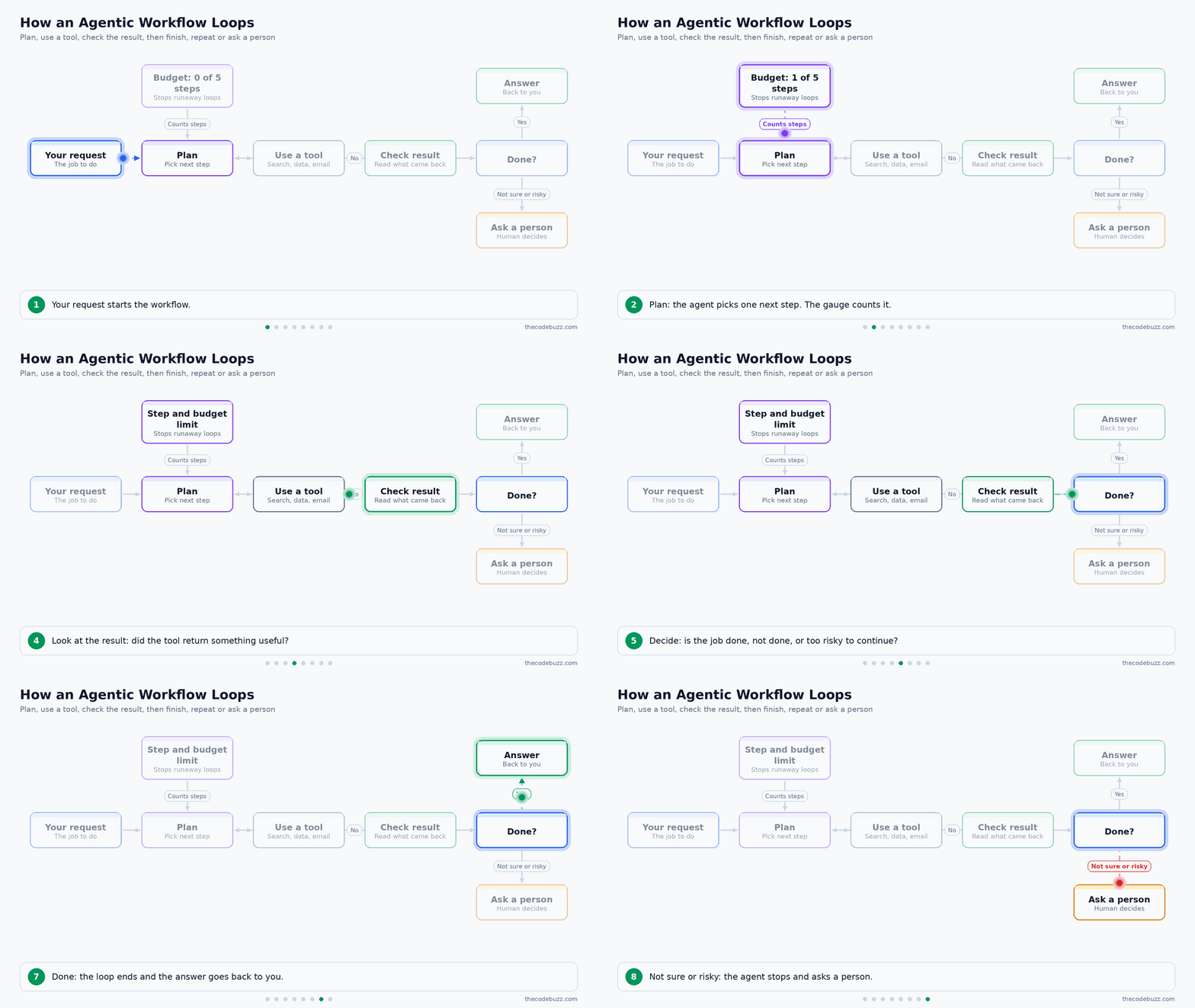
These are the four terms you need for the rest of the article:
- Agentic workflow: In simple terms, a task where an AI repeats the think, act, check loop until the job is done.
- Agent: In simple terms, the AI part that chooses its own next step.
- LLM: In simple terms, a large language model, the program that reads and writes text.
- Tool call: In simple terms, the AI asking your code to run an action, such as a search or a database lookup.
Why it matters: without limits, state and checks, an agent can loop forever, spend money, or take a wrong action nobody notices.
Workflow or Agent: Who Decides the Steps?
The difference is who picks the path. In a workflow, your code decides the steps and the model fills them in. In an agent, the model decides the steps and the tools to use. This difference drives the agent workflow vs autonomous agent choice covered later.
Agentic Workflow Best Practices at a Glance
The rules below run in order from architecture decisions to day-to-day operations, so you can read the table top to bottom as a design sequence.
Four terms appear in the table. In simple terms, an idempotent call gives the same result when repeated. Least agency means giving an agent only the autonomy and permissions its task needs. Model tiering means using a small, cheap model for easy steps and a larger one for hard steps. A trajectory is the full sequence of steps and tool calls in one run.
Tip: an idempotent action is like a light switch marked “set to ON”. Pressing it twice leaves the light on. A toggle switch is not idempotent, because pressing it twice undoes the first press. This is why a retry is safe for one and risky for the other.
This table shows what to do and what to avoid in each area of an agentic workflow:
| Area | Do this | Avoid this |
|---|---|---|
| Architecture choice | Pick the simplest design that meets the task. | Using an autonomous agent where a fixed workflow works. |
| Patterns | Use named agentic workflow design patterns with clear roles. | Adding agents without distinct tools or permissions. |
| State | Keep an explicit state object outside the prompt. | Holding state only in the conversation text. |
| Tool design | Use typed schemas, single-purpose tools, idempotent writes and input validation. | Free-text arguments and “do everything” tools. |
| Loop limits and budgets | Cap steps, time and cost per run. | Open-ended loops. |
| Retries and durability | Checkpoint each step and retry only safe calls. | Restarting from zero or retrying non-idempotent writes. |
| Human approval | Gate risky actions by risk level. | Approving every step. |
| Security | Use least agency and task-scoped credentials. Treat tool output and retrieved content as untrusted data. | Broad long-lived keys, or obeying text found in tool results. |
| Observability | Trace each run as one tree. | Logging only the final answer. |
| Evaluation | Score trajectories and keep a regression suite. | Checking only final-answer quality. |
| Cost | Use model tiering, prompt caching and context compression. | Sending the largest model the full history on every step. |
| Dependency pinning | Pin framework, SDK and protocol versions. | Floating versions on fast-moving or 0.x packages. |
Each row is explained with its trade-off in the sections below.
Agentic AI Workflow Architecture: Where It Fits in the Pipeline
The agentic layer sits between retrieval and the user. It calls the knowledge built during ingestion, the tools and the LLM, while evaluation and operations wrap around the whole thing. The animated diagram below shows a document flowing into storage, then a user question driving the agent.

What does each pipeline stage do for the agent?
Each stage prepares something the agent uses at run time. Weak work early in the pipeline shows up later as poor agent decisions.
- Ingestion: loads and cleans source documents.
- Chunking: splits documents into pieces. In simple terms, a chunk is one small passage cut from a longer document.
- Embeddings: turn each chunk into numbers. In simple terms, an embedding is a list of numbers that places a text on a map of meaning.
- Vector store: keeps those embeddings searchable. In simple terms, a vector store is a database that finds texts by meaning instead of exact words.
- Retrieval: fetches the best-matching chunks for a question. In simple terms, retrieval is looking up the most relevant passages before answering.
- LLM: reads the prompt and writes text or picks a tool. It can only use what fits in its context window. In simple terms, the context window is the amount of text the model can read at once.
- Agent or workflow control: decides the next step, enforces limits and stores state.
- Evaluation and operations: record traces, budgets and alerts, and test behaviour.
Retrieval is one tool the agent can call, next to APIs and databases. If it returns the wrong chunks, every later step reasons from bad evidence.
Tip: Think of a research assistant with a library built in advance. The pipeline stocks and indexes the shelves. The agent decides when to visit them, which other tools to use, and when to stop. The analogy stops at one point: the assistant is a language model, so it can misread a good source with confidence.
Which orchestration approach should you choose?
Choose by failure semantics first: what happens on a crash, a timeout or bad tool output. Framework style comes second. The table below compares the four kinds of tooling, with facts dated 2026-10-17.
| Kind | What it gives you | Dated facts |
|---|---|---|
| Agent frameworks | Control flow encoded as graphs or handoffs | LangGraph 1.2.16 (PyPI, Oct 16, 2026) has type-safe streaming, graceful shutdown and human-in-the-loop interrupts. Checkpoints use SQLite or memory for development and PostgreSQL for production. OpenAI Agents SDK is 0.23.1 (Oct 2, 2026), still 0.x, with the API changing between minor versions. Microsoft Agent Framework 1.0 reached GA on Apr 3, 2026 for .NET and Python, with MCP and A2A interoperability. |
| Durable workflow engines | Retries, checkpoints and crash recovery | Best when runs are long or side effects are costly. |
| Managed agent platforms | Hosted harness, sessions and sandboxes | OpenAI Agents API has been in public beta since Sep 10, 2026, with durable sessions, MCP servers and sandboxes. |
| Plain code, no framework | Full control, no dependency | Enough for a short fixed chain. |
Pick the least autonomous architecture that meets the task. A short fixed chain does not need a framework. Pin exact versions in production, because LangGraph ships frequent patch releases and the OpenAI SDK is pre-1.0.
Agent Workflow vs Autonomous Agent: Choosing Patterns
Start with a single LLM call plus retrieval and examples. Move to a fixed workflow if that is not enough. Use an autonomous agent only when the steps cannot be known in advance.
Agentic systems usually trade latency and cost for better task performance, so each step up must earn its place. A study of production agents found that 16 of 20 case studies (80%) used predefined structured workflows, chosen for controllability and human oversight.
Tip: A workflow is a recipe card: the steps are written down and the cook follows them. An agent is a chef who decides the next step after tasting the dish. The analogy stops there: the chef here is a language model, so it can be confidently wrong and needs limits and checks.
Which design should you choose?
Apply these decision rules in order:
- Steps known: use a fixed workflow, where your code decides the order.
- Path depends on what the model finds: use an agent, but only if the task value justifies the extra cost and latency.
- Mistake is costly or irreversible: add human approval gates before the risky action.
The animated diagram below walks a new task through these questions.
Which agentic workflow design patterns exist?
In simple terms, an orchestrator is a coordinator that splits a task and hands the parts to workers. This table compares the common agentic workflow design patterns.
| Pattern | Use when | Cost or latency trade-off | Main risk |
|---|---|---|---|
| Prompt chaining | A task splits into fixed sequential steps | One call per step, so latency adds up | An early error passes to later steps |
| Routing | Input types need different handling | One cheap classification call | Misrouted requests |
| Parallelization | Subtasks are independent | Lower latency, same or higher token cost | Merging conflicting results |
| Orchestrator-workers | Subtasks are not known until runtime | Extra planning call plus worker calls | Poor task splitting |
| Evaluator-optimizer | Clear quality criteria allow iterative improvement | Each round adds calls | Endless refinement without a round limit |
| Plan-and-execute | A plan can be written first, then run | One planning call, cheaper execution steps | A stale plan when reality changes |
| Supervisor and workers | Roles need different tools or permissions | Every handoff adds cost and delay | Unclear ownership between agents |
When should you split into multiple agents?
Split only when roles need different tools, permissions or context. More agents multiply cost, latency and failure points, because every handoff is another place for a call to fail or for context to be lost. In multi-agent orchestration patterns, one agent with well-scoped tools is the default to beat.
Use Case: A retail returns-triage workflow routes each request to refund, exchange or fraud review. The categories are known, so a router plus fixed branches is enough, and refunds above a set amount wait for human approval.
Use Case: A finance research task uses orchestrator-workers. The orchestrator picks which filings and news to read based on the question, workers summarise each source, and an analyst reviews the draft before it is shared.
Build the Agent Loop: State, Limits, Durability and Approvals
An operable agent loop has an explicit state object (plan, observations, remaining budget), typed tool schemas, a retry policy, a loop limit, a per-step timeout, a cost budget and clear termination outcomes: succeeded, gave up or escalated. The CoreWeave production guide lists these as the minimum for knowing what an agent did and why it stopped. The same pieces are the base of production AI agents checklist items such as limits, retries and approvals.
Tip: Think of a contractor with a work order: a task list, a spending cap, a deadline and a rule to phone the client before any big purchase. The analogy stops at trust. A language model can be confidently wrong, so your code enforces the cap, the deadline and the phone call. It does not rely on the model to respect them.
The animated diagram below shows one pass of the loop, the state card that changes on every pass, and the three ways the loop can end.
Which terms does the loop use?
- Agent state: In simple terms, it is the notebook the agent carries between steps: the goal, the plan, what it has seen and how much budget is left.
- Token: In simple terms, it is a small piece of text (a word or part of a word) that models read and write. Cost is usually counted in tokens.
- Temperature: In simple terms, it is a setting for how adventurous the model’s word choices are. Set it low for tool selection, because you want the same situation to give the same tool and well-formed arguments, not creative variation.
- Idempotency: In simple terms, doing the same action twice has the same effect as doing it once. Reading an order is idempotent. Charging a card is not, unless you send an idempotency key the payment service can recognise.
- Checkpoint: In simple terms, it is a saved copy of the state after a step, like a game save, so a crash resumes instead of restarting.
- Superstep: In simple terms, it is one round of a graph-based framework in which the ready steps run and the state is saved. LangGraph uses this term.
How do you set loop limits and budgets?
The research gives no universal numbers for step limits, timeouts or cost caps, so treat every default as a placeholder to be tuned. Replay a set of real tasks and record the step-count distribution and the cost per successful run. Set the loop limit slightly above a high percentile of successful runs, then review every run that hits it. Those runs show whether the limit is too tight or the agent is genuinely stuck.
How do you make the loop survive failures?
Checkpoint after every step. Retry only idempotent calls, or writes that carry an idempotency key. Classify each error before deciding what to do:
| Error class | Example | Action |
|---|---|---|
| Retryable | Timeout, dropped connection | Retry with backoff, up to a fixed count |
| Fatal | Bug, unknown tool, retries exhausted | Stop and give up |
| Needs a human | Permission denied, risky action declined | Escalate |
Send exhausted tasks, with their saved state, to a dead-letter queue. In simple terms, that is a holding tray for jobs that failed, kept so a person can inspect and replay them. LangGraph’s graceful shutdown stops a run after the current superstep and saves a resumable checkpoint. Its checkpoint backends are in-memory or SQLite for development and PostgreSQL for production.
How do you add human approval?
For human-in-the-loop AI agents, interrupt before risky tools such as payments, deletes and outbound emails. Show the proposed arguments, then resume on approve or edit. Gate by risk level only, because approval fatigue is real: reviewers who see every action start approving without reading.
Python example: a bounded agent loop
Here’s a simplified example using the standard library and pydantic v2. The call_llm function is a stub you replace, and you can add custom logic for planning, logging and storage.
Python
import time
import uuid
from dataclasses import dataclass, field
from enum import Enum
from typing import Any, Callable

from pydantic import BaseModel, Field, ValidationError


class Outcome(Enum):
    SUCCEEDED = "succeeded"
    GAVE_UP = "gave_up"
    ESCALATED = "escalated"


@dataclass
class AgentState:
    goal: str
    run_id: str = field(default_factory=lambda: uuid.uuid4().hex)
    plan: list[str] = field(default_factory=list)
    observations: list[str] = field(default_factory=list)
    step: int = 0
    tokens_used: int = 0
    cost_usd: float = 0.0
    answer: str | None = None


class Decision(BaseModel):
    action: str  # "tool" or "finish"
    tool: str | None = None
    args: dict[str, Any] = Field(default_factory=dict)
    answer: str | None = None
    tokens: int = 0
    cost_usd: float = 0.0


class RefundArgs(BaseModel):
    order_id: str = Field(pattern=r"^ORD-\d{6}$")
    amount: float = Field(gt=0, le=500)


def issue_refund(args: RefundArgs, idempotency_key: str) -> str:
    # Replace: send idempotency_key to the payment API so a retry cannot pay twice.
    return f"refund of {args.amount} queued for {args.order_id}"


@dataclass
class Tool:
    args_model: type[BaseModel]
    func: Callable[[Any, str], str]
    risky: bool = False
    idempotent: bool = False  # True = read-only, or a write that uses the key


RETRYABLE = (TimeoutError, ConnectionError)


def call_llm(state: AgentState) -> Decision:
    # Stub: call your model here (low temperature) and return a Decision.
    raise NotImplementedError


def call_tool(tool: Tool, args: BaseModel, key: str, retries: int, deadline: float) -> str:
    attempts = retries + 1 if tool.idempotent else 1
    for attempt in range(attempts):
        try:
            return tool.func(args, key)
        except RETRYABLE:
            if attempt == attempts - 1 or time.monotonic() >= deadline:
                raise
            time.sleep(min(0.5 * 2**attempt, 5))
    raise RuntimeError("unreachable")


def run_agent(
    state: AgentState,
    tools: dict[str, Tool],
    approve: Callable[[str, BaseModel], BaseModel | None],
    save_checkpoint: Callable[[AgentState], None],
    *,
    max_steps: int = 8,         # placeholders: tune from replayed real tasks
    max_cost_usd: float = 0.50,
    timeout_s: float = 60.0,
    max_retries: int = 2,
) -> Outcome:
    deadline = time.monotonic() + timeout_s
    while (state.step < max_steps and state.cost_usd < max_cost_usd
           and time.monotonic() < deadline):
        decision = call_llm(state)
        state.step += 1
        state.tokens_used += decision.tokens
        state.cost_usd += decision.cost_usd

        if decision.action == "finish":
            state.answer = decision.answer
            save_checkpoint(state)
            return Outcome.SUCCEEDED

        tool = tools.get(decision.tool or "")
        if tool is None:
            state.observations.append(f"unknown tool: {decision.tool}")
        else:
            try:
                args = tool.args_model.model_validate(decision.args)
            except ValidationError as exc:
                state.observations.append(f"invalid arguments: {exc}")
            else:
                if tool.risky:
                    args = approve(decision.tool, args)  # approve, edit or decline
                    if args is None:
                        save_checkpoint(state)
                        return Outcome.ESCALATED
                key = f"{state.run_id}-{state.step}"  # stable across retries
                try:
                    state.observations.append(
                        call_tool(tool, args, key, max_retries, deadline))
                except PermissionError:
                    save_checkpoint(state)
                    return Outcome.ESCALATED
                except Exception as exc:  # fatal or retries exhausted
                    state.observations.append(f"tool failed: {exc}")
                    save_checkpoint(state)
                    return Outcome.GAVE_UP
        save_checkpoint(state)  # checkpoint after every step

    save_checkpoint(state)  # caller pushes this state to the dead-letter queue
    return Outcome.GAVE_UP
run_agent returns an Outcome (SUCCEEDED, GAVE_UP or ESCALATED) and saves the state before every return, so a person or a replay job can pick up from the last step.
One limit to know: the loop checks the deadline between steps, so each tool function must enforce its own per-step timeout.
How does this map to agent frameworks?
The same loop appears in LangGraph, the OpenAI Agents SDK and Microsoft Agent Framework under different names. Your state object becomes the framework’s state or session, the checkpoint function becomes its persistence layer, and the approval callback becomes an interrupt or approval hook. Check each framework’s documentation for exact signatures. Pin versions, because the OpenAI SDK is still 0.x (0.23.1 on Oct 2, 2026) and LangGraph ships frequent patch releases (1.2.16 on Oct 16, 2026).
Secure Agentic Workflows with OWASP Agentic Top 10 Controls
Apply least agency. An agent gets only the autonomy, tools and credentials the task needs, and it earns more only after evaluation. Use the OWASP Top 10 for Agentic Applications 2026 (released Dec 9, 2025, ASI01 to ASI10) as your review checklist.
Tip: Think of a temp worker given a key card that opens only the rooms needed today, and that stops working tonight. Unlike a human temp, an agent can be tricked by a sentence hidden in a document it reads. So the key card limits matter even more.
Which OWASP agentic risks should you check?
Here are the ten risks in their published order, each with a typical symptom and a control.
| OWASP risk | What it looks like | Control |
|---|---|---|
| Agent Goal Hijack | A web page or email changes the agent’s objective | Treat retrieved content and tool output as data, never as instructions |
| Tool Misuse | A valid tool is called with harmful arguments | Scoped tools with parameter validation |
| Identity and Privilege Abuse | One broad key is reused across tasks | Short-lived, task-scoped credentials |
| Agentic Supply Chain Vulnerabilities | A compromised plugin or tool server | Pin versions, vet tool servers, record what you run |
| Unexpected Code Execution | Generated code runs on the host | Sandboxed execution |
| Memory and Context Poisoning | Bad facts saved to memory affect later runs | Validate what is stored; expire and audit memory |
| Insecure Inter-Agent Communication | One agent trusts another’s message blindly | Authenticate agents; validate messages like any input |
| Cascading Failures | One bad step spreads through many agents | Loop limits, budgets, kill switch |
| Human-Agent Trust Exploitation | A confident answer persuades a user to approve a bad action | Show proposed arguments; approval for sensitive actions |
| Rogue Agents | An agent drifts from its intended behaviour | Audit logs, monitoring, kill switch |
In simple terms, a sandbox is a locked room where code can run without touching your real systems.
How do MCP tool servers change the security picture?
As of 2026-10-17, the current MCP revision is 2026-07-28 (the previous final one is 2025-11-25). In simple terms, MCP (Model Context Protocol) is a standard way for agents to discover and call tools on a server.
The new revision is stateless. The initialize handshake and the Mcp-Session-Id header are gone. Each request now carries its protocol version, client identity and capabilities in _meta. The revision also adds Multi Round-Trip Requests, header-based routing, cacheable list results, hardened authorization and an extensions framework.
- Scale freely: servers can sit behind a load balancer without sticky sessions.
- Keep state out of the server: hold per-session data in your agent state, where you can checkpoint and audit it.
- Test before migrating: the C# SDK v2.0 implements this spec, but the Python, TypeScript, Go and C# SDKs are in beta.
Use Case: A healthcare scheduling agent gets a read-only calendar tool to find open slots. A separate booking tool sits behind human approval, which shows the patient, slot and clinician. Its credential is valid only for that task. Every call lands in the audit log.
Observe, Evaluate and Tune Agents: Tracing, Evals, Cost and Latency
Trace every run as one tree, evaluate whole trajectories (the full sequence of steps, not just the final answer), and set your limits and model tiers from that data. This is the core of AI agent observability and guardrails.
How do you trace an agent run?
Record each run as one trace with a span per step. In simple terms, a span is a timed record of one action, and a trace is the tree of spans for one run. OpenTelemetry is an open standard for producing and exporting this data. Its GenAI conventions put an invoke_agent span at the top, with chat spans for model calls and execute_tool spans for tool calls beneath it.
Tip: A trace is like a receipt that lists every task the assistant did, in order, with the time each took. Unlike a receipt, it can also show which step failed and why.
The animated diagram below builds this tree step by step for a refund agent and sends the finished trace to the eval suite and alerts.
Per step, record tokens, cost, latency, retry count and the final termination outcome. Prompt and response content is opt-in, because it can contain personal data. The spec is still marked Development, so attribute names can change. Keep them in one helper.
C#
using System.Diagnostics;

// Simplified helper. Attribute names may change while the GenAI spec is in Development.
public static class AgentTrace
{
    private static readonly ActivitySource Source = new("TheCodeBuzz.Agents");

    public static Task<T> AgentAsync<T>(string agent, Func<Task<T>> body) =>
        Run($"invoke_agent {agent}", "invoke_agent", "gen_ai.agent.name", agent, body);

    public static Task<T> ChatAsync<T>(string model, Func<Task<T>> body) =>
        Run($"chat {model}", "chat", "gen_ai.request.model", model, body);

    public static Task<T> ToolAsync<T>(string tool, Func<Task<T>> body) =>
        Run($"execute_tool {tool}", "execute_tool", "gen_ai.tool.name", tool, body);

    public static void RecordUsage(int inputTokens, int outputTokens)
    {
        Activity.Current?.SetTag("gen_ai.usage.input_tokens", inputTokens);
        Activity.Current?.SetTag("gen_ai.usage.output_tokens", outputTokens);
    }

    private static async Task<T> Run<T>(string name, string operation,
        string key, string value, Func<Task<T>> body)
    {
        using var activity = Source.StartActivity(name);
        activity?.SetTag("gen_ai.operation.name", operation);
        activity?.SetTag(key, value);
        try
        {
            return await body();
        }
        catch (Exception ex)
        {
            activity?.SetStatus(ActivityStatusCode.Error, ex.Message);
            activity?.SetTag("error.type", ex.GetType().FullName);
            throw;
        }
    }
}
Nested calls become child spans automatically, because Activity.Current flows through async code. Register the source with AddSource("TheCodeBuzz.Agents") in OpenTelemetry for .NET, otherwise StartActivity returns null and nothing is exported.
How do you evaluate an agent?
Build a regression suite from real tasks and score the trajectory, not only the answer. A trajectory evaluation checks the path the agent took. A regression suite is a fixed set of tests you rerun after every change.
- Trajectory checks: right tool, right arguments, no forbidden calls, step count and cost.
- Answer quality: score the final output separately.
- Rerun on any change: prompt, tool schema or model, because they interact.
- Adversarial cases: include prompt injection hidden in tool output.
- Two environments: keep offline evals apart from sampled production evals.
How do you control cost and latency?
Pick the controls below and check each against your eval suite. Every one trades something for speed or savings.
| Control | Benefit | Trade-off |
|---|---|---|
| Token budget per run | Caps worst-case spend | Hard tasks may stop early |
| Model tiering | Small model for routing and extraction, larger for hard planning | Routing mistakes reach the weaker model |
| Caching | Stable prompt prefixes and cacheable MCP list results | Stale data if the prefix or list changes |
| Context compression | Summarise old steps to shrink input | Detail can be lost |
| Parallel tool calls | Lower latency for independent steps | Harder error handling |
| Streaming | Users see partial output sooner | Early text may be revised |
To tune tiers, plot cost per successful task against success rate for each tier. Choose the knee of the curve, where extra spend stops buying much accuracy.
Which alerts should you set?
Alert on loop-limit hits, escalation rate, cost per run and tool error rate. Review every run that hits a limit, since that shows whether the limit or the task design is wrong. These signals also belong on any production AI agents checklist.
Common Anti-Patterns in Agentic Workflows
Most failures in production AI agents come from a small set of repeated design mistakes. The table below lists nine of them with the symptom you will see and the fix.
Tip: An anti-pattern is a habit that looks sensible at first and causes trouble later, like a manager who gives a new assistant the master key, no deadline and no instructions to report back. The analogy stops at one point: a human assistant would usually push back, while a language model will keep going.
Which Agentic Workflow Mistakes Should You Avoid?
Use this table as a review list for agentic AI workflow architecture and for any production AI agents checklist.
| Anti-pattern | Symptom | Fix |
|---|---|---|
| Agent used where a fixed workflow would do | Slow, costly runs with varying paths for a known task | Use a workflow when the steps are known (see agent workflow vs autonomous agent) |
| No loop limit or budget | Runs that never end; surprise bills | Set max steps, a deadline and a cost budget |
| Free-text tool arguments | Malformed calls, wrong values reach the tool | Use typed schemas and validate before executing |
| Retrying non-idempotent writes | Duplicate refunds, emails or bookings | Retry only idempotent calls, or send idempotency keys |
| State only in the prompt | A crash restarts the task; context grows without control | Keep an explicit state object and checkpoint each step |
| Trusting tool output or retrieved text as instructions | The agent follows commands hidden in a web page or document | Treat it as data only; add injection tests |
| Broad, long-lived credentials | One bug or hijack exposes every system | Use short-lived, task-scoped credentials |
| Evaluating only the final answer | Right answer, but forbidden calls or wasted steps go unseen | Score the whole trajectory: tools, arguments, step count, cost |
| Floating versions on a 0.x SDK | An upgrade silently changes behavior | Pin exact versions and re-run the regression suite before upgrading |
| Many agents with unclear roles | Handoff loops, higher cost, hard debugging | Split only when roles need different tools, permissions or context |
For multi-agent orchestration patterns, human-in-the-loop AI agents and AI agent observability and guardrails, see the sections that cover each in detail.
Production Readiness Checklist for AI Agents
Use this production AI agents checklist before you release an agent to real users. It runs from design to operations. Every item can be verified with a test, a config value or a dashboard.
Tip: Think of the pre-flight checklist a pilot runs before takeoff. Each line is a quick, checkable fact, not an opinion. The analogy stops in one place: an agent’s checklist must be run again whenever the prompt, a tool or the model changes.
Work through these items in order:
- Architecture choice: Write down why a single LLM call or fixed workflow is not enough. If you can’t, don’t build an agent.
- Outcomes: Define succeeded, gave up and escalated, plus the conditions that end a run.
- Tools: Give every tool a typed schema. Validate arguments before the tool runs.
- State: Keep an explicit state object and checkpoint after every step.
- Limits: Set step, time and cost limits from replayed eval data, not guesses.
- Retries: Retry only idempotent calls. Send exhausted tasks to a dead-letter queue with their saved state.
- Approvals: Add human-in-the-loop AI agent gates on payments, deletes and outbound messages.
- Least agency: Use short-lived, task-scoped credentials and sandboxed code, mapped to each OWASP agentic risk.
- Tracing: Trace each run as one tree. Keep prompt and response capture off by default.
- Regression suite: Run trajectory evals in CI on every prompt, schema or model change, including prompt injection cases that arrive through tool output.
- Versions: Pin dependencies and record the MCP spec version you tested against.
- Operations: Set alerts for loop-limit hits, escalation rate, cost per run and tool errors. Rehearse the kill switch and the rollback plan before you need them.
Glossary in Plain English
This glossary lists the terms used in this article on agentic AI workflow architecture, grouped by topic. Each analogy comes with a note where it stops being accurate.
In plain English: Treat the analogies as a phrasebook, not a specification. They help you picture an idea, and the third column says where each picture stops matching the real thing.
Models and Cost Terms
These terms describe the model and what it costs to run.
| Term | What it means in plain English | Everyday analogy |
|---|---|---|
| Agentic workflow | A program where a language model and tools work through a task in steps. Either code or the model chooses the steps. | An assistant working down a to-do list. Unlike a person, the model can be confidently wrong, so it needs checks. |
| Agent | A setup where the model itself decides the next step and which tool to use. | A contractor who plans the job. Unlike a contractor, it needs a hard budget and time limit. |
| LLM | Large language model: software that produces text based on patterns learned in training. | A very well-read autocomplete. It does not look facts up unless you give them to it. |
| Tool call | A structured request from the model asking your code to run a function. | An order slip passed to a kitchen. The model writes the slip, and your code does the cooking. |
| Token | A small piece of text (a word or part of a word) that models read and bill by. | Words in a telegram, priced per piece. Tokens do not map exactly to words. |
| Context window | The maximum number of tokens the model can consider at once. | A desk: only so many papers fit. Anything off the desk is not seen at all. |
| Temperature | A setting for how random the output is. Low values give steadier answers. | A dial from strict clerk to brainstorming partner. Low does not mean correct, only repeatable. |
| Hallucination | A confident answer that is false or invented. | Someone bluffing in a meeting. The model has no intent to deceive. |
| Model tiering | Using a small, cheap model for easy steps and a larger one for hard steps. | A triage nurse and a specialist. Routing mistakes by the nurse still reach the patient. |
Knowledge and Retrieval Terms
These terms cover how knowledge gets to the agent.
| Term | What it means in plain English | Everyday analogy |
|---|---|---|
| Chunk | A small piece of a longer document, cut so it can be searched and passed to the model. | An index card from a book. A bad cut can separate a fact from its context. |
| Embedding | A list of numbers that represents the meaning of a text. | A GPS coordinate on a map of meaning. The real map has hundreds of dimensions, not two. |
| Vector store | A database that finds items whose embeddings are closest to a query. | A library shelved by topic instead of title. “Close” means similar, not necessarily correct. |
| Retrieval | Fetching the most relevant chunks for a question. | A librarian pulling cards. If the wrong cards come back, the answer suffers. |
Loop and Reliability Terms
These terms describe how the loop keeps running and recovers from failure.
| Term | What it means in plain English | Everyday analogy |
|---|---|---|
| Agent state | The record of the plan, results so far and remaining budget. | A case file. It only helps if the agent actually reads and updates it. |
| Checkpoint | A saved copy of the state after a step, so a crashed run can resume. | A video-game save. It also stores tool results, which may have changed in the outside world since. |
| Superstep | One round of a graph workflow (a LangGraph term) where ready steps run, then state is saved. | A board-game turn where everyone moves, then the board updates. |
| Idempotency | Repeating an action has the same effect as doing it once. | Pressing a lift button twice. Sending an email is not idempotent unless you add an idempotency key. |
| Dead-letter queue | A holding area for tasks that failed every retry, kept with their saved state. | The undeliverable-mail room. Someone still has to open the items. |
| Human-in-the-loop | A person approves or edits a risky step before it runs. | A countersigned cheque. Too many requests lead to rubber-stamping. |
| Orchestration | The control logic that sequences steps, tools, retries and limits. | A conductor. The conductor does not play any instrument. |
| MCP | Model Context Protocol: a standard way for agents to talk to tool servers. | A USB port. The plug fits, but you still choose what to plug in. |
| Stateless | The server keeps nothing between requests, so each request carries what it needs. | A cashier who forgets you after each sale, so you bring your own receipt. |
Security and Observability Terms
These terms cover protection, monitoring and testing.
| Term | What it means in plain English | Everyday analogy |
|---|---|---|
| Prompt injection | Hidden instructions inside text the model reads, meant to change its behaviour. | A forged note slipped into an assistant’s inbox saying “ignore your boss”. |
| Least agency | Giving an agent only the autonomy and access its task needs. | A hotel keycard that opens only your room. |
| Sandbox | An isolated area where generated code runs without touching real systems. | A test kitchen. A badly configured one can still leak. |
| Span / trace | A span is one timed step. A trace is the full tree of spans for one run. | Parcel tracking: each scan is a span, and the whole history is the trace. |
| OpenTelemetry | An open standard for emitting traces and metrics to monitoring tools. | A common plug shape for monitoring equipment. |
| Trajectory evaluation | Scoring the path an agent took (tools, arguments, steps, cost), not only its final answer. | Marking the working in a maths exam, not just the result. |
| Regression suite | A fixed set of real tasks re-run after every change to catch new failures. | A pre-flight checklist. Passing it does not cover cases it never listed. |
Key Takeaways
These are the points to keep from the article, ordered from design decisions to operations.
- Start with the simplest design: try a single LLM call with retrieval and examples first, then a fixed workflow. Use an autonomous agent only when the steps cannot be known in advance, because agents usually cost more in latency and money.
- Workflows dominate production: in the study cited earlier, 16 of 20 case studies (80%) used predefined structured workflows for control and human oversight. If code can decide the steps, let code decide them.
- Make the loop explicit and bounded: keep an explicit state object, typed and validated tool schemas, and limits for steps, time and cost. Return a clear outcome (succeeded, gave up or escalated). Set the limits from replayed real tasks, not from a universal number.
- Design for crashes and retries: checkpoint after every step, retry only idempotent calls (or use idempotency keys for writes), and send exhausted tasks to a dead-letter queue with the saved state. Choose tooling by failure semantics before framework style.
- Apply least agency and the OWASP list: give agents short-lived, task-scoped credentials and scoped tools. Treat retrieved content and tool output as untrusted data, sandbox code execution, and gate risky actions by risk level. Keep a kill switch and audit logs.
- Trace and evaluate trajectories: record each run as one trace tree and score the tools, arguments, step count and cost, not only the final answer. Re-run the regression suite whenever the prompt, tool schema or model changes.
- Pin versions and re-check dated facts: LangGraph patch releases are frequent, the OpenAI Agents SDK is still 0.x, and the OpenTelemetry GenAI conventions are still in Development. Record the MCP spec revision you target, and re-verify the version facts dated 2026-10-17 before you rely on them.
That’s all! Happy coding!
Did this solve your problem? Please share your questions or experience in the comments below. Bookmark this page or share it with your team, and subscribe to TheCodeBuzz for more AI engineering best practices.
FAQ
What is an agentic workflow and how is it different from an AI agent?
An agentic workflow is a process where code sets the steps and a language model does the work inside them (e.g. classify, look up, draft). An AI agent is different because the model itself decides which step or tool comes next. Most production systems use workflows for this reason, since a fixed path is easier to test, limit and audit. Many real systems mix both, with a fixed outer flow and one agent loop for a single open-ended step.
When should I use a fixed workflow instead of an autonomous agent?
Use a fixed workflow whenever you can write down the steps before the task starts. Start with a single model call plus retrieval and examples, move to a workflow if that is not enough, and use an agent only when the path depends on what the model finds along the way. Agents usually cost more and respond more slowly, so the task value must justify that. If a wrong action is expensive, add an approval gate whichever design you pick.
How do I control cost and latency in an agent loop?
Set hard limits first: a maximum step count, a per-step timeout, a deadline and a token or cost budget per run. Then reduce spend with model tiering (a small model for routing and extraction, a larger one for hard planning), caching of stable prompt prefixes, summarising old steps, and parallel calls for independent tools. Summarising can drop detail, so check it against your regression suite. Tune the numbers from real traces by comparing cost per successful task with success rate for each tier.
How do I add human-in-the-loop approval to an agent?
Pause the loop before any risky tool call, such as a payment, a delete or an outbound email, and show the reviewer the exact proposed arguments. Save the agent state at that point so the run can resume after the person approves, edits or rejects the action. Frameworks such as LangGraph offer interrupts for this, and the same idea works in plain code with an approval callback. Gate by risk level only, because asking for approval on every step leads to reviewers clicking through without reading.
What are the biggest security risks for agentic applications, and how do I reduce them?
The OWASP Top 10 for Agentic Applications 2026 is the best checklist, and its risks include agent goal hijack, tool misuse, identity and privilege abuse, and memory and context poisoning. The guiding rule is least agency: give the agent only the autonomy and access it has earned. In practice, use short-lived credentials scoped to the task, validate tool parameters, run generated code in a sandbox, and treat retrieved content and tool output as untrusted data, never as instructions. Add approval for sensitive actions, audit logs and a kill switch.
Sources and further reading
- Building Effective AI Agents (Anthropic Engineering)
- Measuring Agents in Production (arXiv)
- Agentic workflows in production: Mechanisms, costs and trade-offs (CoreWeave)
- OWASP Top 10 for Agentic Applications – The Benchmark for Agentic Security in the Age of Autonomous AI (OWASP Gen AI Security Project)
- Lessons from OWASP Top 10 for Agentic Applications (Auth0)
- langgraph · PyPI (PyPI)
- LangGraph 1.0 and 1.2 in 2026: Why Durable State Has Changed Everything for Python Agent Developers (JBI Training)
- Releases · openai/openai-agents-python (GitHub (OpenAI))
- Changelog (OpenAI)
- Microsoft Ships Production-Ready Agent Framework 1.0 for .NET and Python (Visual Studio Magazine)
Please share this article with your friends and Subscribe to the blog to get a notification on freshly published best practices of software development.