MongoDB query Remove/Delete records in a Collection

Today in this article, we will cover how to write MongoDB query Remove/Delete records in a Collection. We will see a simple query to delete all the records and also delete records based on filter criteria.
Updated October 2026: a deleteOne vs deleteMany section, a drop() vs deleteMany({}) section, remove() deprecation notes and an FAQ.
We will use the Mongo Shell query to perform the deletes. If you are interested to perform delete within Atlas UI compass please refer to this article.
You may find the need to delete the records from a mongo collection from time to time, especially when performing the schema update or data cleanup.
While dropping the collection is another easier way to delete the records which not only deletes the collection but also deletes all the records along with indexes if any.
MongoDB Delete All records
But if you want to delete the records without deleting the collection or indexes then you can use the below command from mongosh
Switch to the Database
Switch to the Database using the command “use”
Command :
use <Your DB>
Example

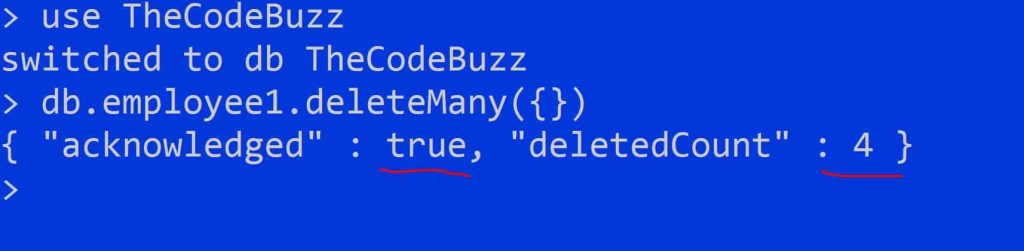
Delete all records using deleteMany
We can easily delete all records using deleteMany() method
Command
db.<collection name>.deleteMany({})
Example
db.employee1.deleteMany({})
drop() vs deleteMany({}): Which Is Better for Emptying a Collection?
Use deleteMany({}) when the collection should stay exactly as it is, and drop() only when you’re ready to rebuild its setup. drop() can be faster on a large collection, but it takes the collection’s configuration with it.
What does each command keep and remove?
The table below compares what survives each command.
| Item | deleteMany({}) | drop() |
|---|---|---|
| Documents | Removed | Removed |
| Collection | Kept | Removed |
| Indexes | Kept | Removed |
| Options and metadata | Kept | Removed |
| Large collections | Slower | Often faster |
In plain English:
deleteMany({})is like emptying every shelf in a library.drop()is like demolishing the building, so you have to rebuild the shelves and rules before reopening.
After a drop, you must recreate the indexes and any settings such as validators yourself. Forget one and the collection quietly behaves differently.
When must you use drop()?
Use drop() for capped and time series collections. deleteMany() throws a WriteError on both, so it can’t clear them. Recreate them with their original options afterwards.
How do you delete a large part of a collection safely?
For a very large partial delete, remove documents in batches instead of in one huge operation. Batching reduces lock contention and the load on the server.
- Fetch a batch: read about 1000
_idvalues that match your filter. - Delete the batch: run a delete with
$inon those_idvalues. - Repeat: loop until the fetch returns nothing.
The trade-off is more round trips between your client and the server. The overall delete is also not atomic. If the loop stops halfway, some matching documents are gone and others remain, so make sure your script can safely run again.
If the collection should keep its indexes, validators and options, stay with deleteMany({}). Choose drop() only when you have the setup written down and can recreate it.
Delete records for filter criteria using deleteMany methods
Example 1:
db.employee1.deleteOne({Name:"Meery"})
Above query will delete only the first matching record(Where Name fields match the value as “Merry” ) for the given filter condition
Example 2:
db.employee1.deleteMany({Name:"Meery"})
The above query will delete all matching records(one or multiple) for the given filter condition.
deleteOne() vs deleteMany(): Delete by _id and Check deletedCount
Use deleteOne() to remove at most one document and deleteMany() to remove every match. Both return an acknowledged flag and a deletedCount, and that count is how you confirm what actually happened.
deleteOne() removes a single document even when several match the filter. If you need to be sure which one goes, filter on _id or another field with a unique index. deleteMany() removes every match, and an empty filter {} matches everything, so a mistyped or missing filter can empty the collection.
In plain English: Asking
deleteOne()to remove “a book by Smith” is like asking a librarian to pull one copy, and you don’t control which. Filtering on_idis like giving the ISBN. The analogy stops atdeleteMany(), which clears the whole shelf of matches.
What does deletedCount tell you?
deletedCount is the number of documents the operation removed. A value of 0 means nothing matched. That is not an error and nothing is thrown, so check the count whenever your code expects the record to exist.
How do you make a bulk delete safer?
Preview first, delete second, then compare. Follow these steps:
- Preview: run the same filter through
find()orcountDocuments()and look at what comes back. - Delete: run
deleteOne()ordeleteMany()with that exact filter. - Compare: check that
deletedCountequals the preview count. If it doesn’t, another writer changed the data in between, or the filter isn’t what you thought.
Index the filter field so the delete doesn’t scan the whole collection.
When do you need the deleted document back?
Use findOneAndDelete() when your code needs the removed document, because it returns it. If you need an audit trail, consider a soft delete instead. You set a deletedAt timestamp and exclude those documents from reads. The trade-off is that the data stays on disk and every query must remember the exclusion.
What are the Mongoose equivalents?
Mongoose offers Model.deleteOne() and Model.deleteMany(), which fire the matching query middleware. findByIdAndDelete(id) is shorthand for findOneAndDelete({ _id: id }) and resolves to null when nothing matched. Model.remove() is deprecated, so replace it with deleteOne() or deleteMany() if you meet it in older tutorials.
Delete all records using remove() methods
We can also easily delete all records using remove() method.
Command
db.<collection name>.remove({})
Example 1
db.employee1.remove({})
Delete records for filter criteria using remove() methods
Example
db.employee1.remove({Name:"John"})
Above query will remove records where Name fields match with value of “John”
Delete records using the Unset operator
One can also delete the records using unset operator too.
For more details please visit below,
References :
Do you have any comments or ideas or any better suggestions to share?
Please sound off your comments below.
Happy Coding !!
Please bookmark this page and share it with your friends. Please Subscribe to the blog to receive notifications on freshly published (2026) best practices and guidelines for software design and development.
Frequently asked questions
What is the difference between deleteOne() and deleteMany() in MongoDB?
deleteOne() removes at most one document, even if several match the filter. deleteMany() removes every document that matches. If you need to control exactly which document deleteOne() removes, filter on _id or another field backed by a unique index.
How do I delete a document in Mongoose and get the deleted document back?
Use findByIdAndDelete(id) with async/await. It’s shorthand for findOneAndDelete({ _id: id }) and returns the removed document, or null if nothing matched. Handle the null case, for example by returning a 404 in an Express route. deleteOne() only gives you a result object with deletedCount, not the document.
Is remove() deprecated in MongoDB and Mongoose?
Yes. Mongoose’s Model.remove() has been deprecated since 5.5.3, so use deleteOne() or deleteMany() instead. Older tutorials that still use remove() are outdated. The mongosh docs list deleteOne() and deleteMany() as the delete methods.
How can I check how many documents were deleted in MongoDB?
Read deletedCount from the result. Both deleteOne() and deleteMany() return an acknowledged flag and that count, and a deletedCount of 0 means no document matched the filter. Before a bulk delete, run countDocuments() with the same filter, then compare the two numbers afterwards.
