Query MongoDB using ObjectId by Date Range

Today this article will see how to write a Query MongoDB using ObjectId by Date Range to get records based on timestamp or date range.
Updated October 2026: a createFromTime vs fromDate section, a UTC and limits section, and an FAQ.
Timestamp details could be useful for many other reasons, It does help in getting the timestamp when the records got added to the MongoDB document the first time. Specifically, when your schema does not contains the timestamp property explicitly.
Today in this article, we will cover below aspects,
Please note that ObjectId is the 12-byte element consisting of a 4-byte timestamp in seconds, a 5-byte random value, and a 3-byte counter.
MongoDB _id field as ObjectId
MongoDB uses the _id field as ObjectId this Id has few behavioral characteristics and it is explained below, A 4-byte timestamp is a UNIX timestamp.
It represents the ObjectId’s creation timestamp when a document is inserted into Mongo collection first time, measured in seconds since the Unix epoch. for more details, please visit here
Getting started
ObjectId Date greater than query
Command
{ <field Name>: { $gt: ObjectId.fromDate( new ISODate("Date here"))}}
OR
{ <field Name>: { $gt: ObjectId.fromDate( new Date("Date here"))}}
Example:
> db.employee.find({_id: {$gt: ObjectId.fromDate( new Date("2021-01-01") )  } });

{ "_id" : ObjectId("617f1b826cbcd5cf388e44f7"), "Name" : "John", "Ssn" : BinData(6,"AQN8hvdzPErPuPBzVdYmjdUCdQEKWLhy6gifgAykIemBsI06Ps+w9IzaZ7sRO8tyh+EfxODhxpmES4u7g10EnZsvXWeUUASeTYsWVb8GMbxUig=="), "City" : "NY", "Country" : "USA", "States" : "NY", "Zip" : "12345", "order" : [ "name1", "name2" ] }
{ "_id" : ObjectId("61ec0d419e5a92743c245375"), "Name" : "Meery", "Ssn" : BinData(6,"AQN8hvdzPErPuPBzVdYmjdUCdQEKWLhy6gifgAykIemBsI06Ps+w9IzaZ7sRO8tyh+EfxODhxpmES4u7g10EnZsvXWeUUASeTYsWVb8GMbxUig=="), "City" : "NY", "Country" : "USA", "States" : "", "Zip" : "12345-0000" }
{ "_id" : ObjectId("61ec0d5e9e5a92743c245376"), "Name" : "Mohn", "Ssn" : BinData(6,"AQN8hvdzPErPuPBzVdYmjdUCdQEKWLhy6gifgAykIemBsI06Ps+w9IzaZ7sRO8tyh+EfxODhxpmES4u7g10EnZsvXWeUUASeTYsWVb8GMbxUig=="), "City" : "NY", "Country" : "USA", "States" : "", "Zip" : "45678-1234" }
{ "_id" : ObjectId("61ec0d789e5a92743c245377"), "Name" : "alex", "Ssn" : BinData(6,"AQN8hvdzPErPuPBzVdYmjdUCdQEKWLhy6gifgAykIemBsI06Ps+w9IzaZ7sRO8tyh+EfxODhxpmES4u7g10EnZsvXWeUUASeTYsWVb8GMbxUig=="), "City" : "TEST", "Country" : "USA", "States" : "OH" }
{ "_id" : ObjectId("62ac091058c3f35ca07859a9"), "Name" : "sr", "Ssn" : BinData(6,"AQN8hvdzPErPuPBzVdYmjdUCdQEKWLhy6gifgAykIemBsI06Ps+w9IzaZ7sRO8tyh+EfxODhxpmES4u7g10EnZsvXWeUUASeTYsWVb8GMbxUig=="), "City" : "NY", "Country" : "USA", "States" : "NY", "Zip" : "12345", "order" : [ "name1", "name2" ] }
ObjectId Date Less than query
Command
{ <field Name>: { $lt: ObjectId.fromDate( new ISODate("Date here"))}}
Example
> db.employee.find({_id: {$lt: ObjectId.fromDate( new Date("2022-01-01") ) } });

{ "_id" : ObjectId("617f1b826cbcd5cf388e44f7"), "Name" : "John", "Ssn" : BinData(6,"AQN8hvdzPErPuPBzVdYmjdUCdQEKWLhy6gifgAykIemBsI06Ps+w9IzaZ7sRO8tyh+EfxODhxpmES4u7g10EnZsvXWeUUASeTYsWVb8GMbxUig=="), "City" : "NY", "Country" : "USA", "States" : "NY", "Zip" : "12345", "order" : [ "name1", "name2" ] }

ObjectId Date greater than and less than query
Command
{<FieldName>: {$lt: ObjectId.fromDate( new Date("2022-05-01") ), $gt: ObjectId.fromDate( new Date("2021-01-01") ) } });
Example:
{_id: {$lt: ObjectId.fromDate( new Date("2022-05-01") ), $gt: ObjectId.fromDate( new Date("2021-01-01") ) } });
> db.employee.find({_id: {$lt: ObjectId.fromDate( new Date("2022-05-01") ),  $gt: ObjectId.fromDate( new Date("2021-01-01") )  } });

{ "_id" : ObjectId("617f1b826cbcd5cf388e44f7"), "Name" : "John", "Ssn" : BinData(6,"AQN8hvdzPErPuPBzVdYmjdUCdQEKWLhy6gifgAykIemBsI06Ps+w9IzaZ7sRO8tyh+EfxODhxpmES4u7g10EnZsvXWeUUASeTYsWVb8GMbxUig=="), "City" : "NY", "Country" : "USA", "States" : "NY", "Zip" : "12345", "order" : [ "name1", "name2" ] }
{ "_id" : ObjectId("61ec0d419e5a92743c245375"), "Name" : "Meery", "Ssn" : BinData(6,"AQN8hvdzPErPuPBzVdYmjdUCdQEKWLhy6gifgAykIemBsI06Ps+w9IzaZ7sRO8tyh+EfxODhxpmES4u7g10EnZsvXWeUUASeTYsWVb8GMbxUig=="), "City" : "NY", "Country" : "USA", "States" : "", "Zip" : "12345-0000" }
{ "_id" : ObjectId("61ec0d5e9e5a92743c245376"), "Name" : "Mohn", "Ssn" : BinData(6,"AQN8hvdzPErPuPBzVdYmjdUCdQEKWLhy6gifgAykIemBsI06Ps+w9IzaZ7sRO8tyh+EfxODhxpmES4u7g10EnZsvXWeUUASeTYsWVb8GMbxUig=="), "City" : "NY", "Country" : "USA", "States" : "", "Zip" : "45678-1234" }
{ "_id" : ObjectId("61ec0d789e5a92743c245377"), "Name" : "alex", "Ssn" : BinData(6,"AQN8hvdzPErPuPBzVdYmjdUCdQEKWLhy6gifgAykIemBsI06Ps+w9IzaZ7sRO8tyh+EfxODhxpmES4u7g10EnZsvXWeUUASeTYsWVb8GMbxUig=="), "City" : "TEST", "Country" : "USA", "States" : "OH" }
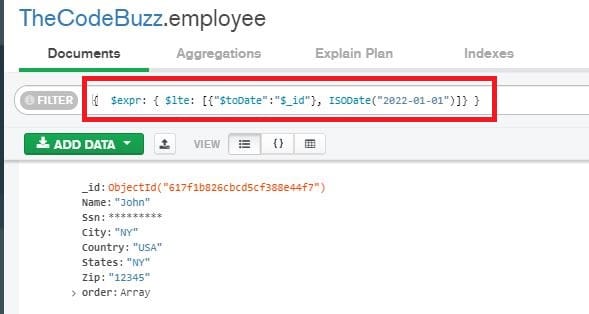
Query MongoDB using ObjectId date – MongoDB Atlas UI
If you are using MongoDB Atlas, please use the below command to perform the date range query using ObjectId.
Command:
{ $expr: { $lte: [{"$toDate":"$<field name>"}, ISODate("Date here")]} }
Example
{ $expr: { $lte: [{"$toDate":"$_id"}, ISODate("2022-01-01")]} }
Do you have any comments or ideas or any better suggestions to share?
Please sound off your comments below.
Happy Coding !!
Please bookmark this page and share it with your friends. Please Subscribe to the blog to receive notifications on freshly published (2026) best practices and guidelines for software design and development.
Check your results: read the date back and know the limits of ObjectId date queries
To confirm your boundary values, call getTimestamp() on an ObjectId, or on doc._id for a fetched document. It returns the creation time as a UTC date. For example, ObjectId('507f1f77bcf86cd799439011').getTimestamp() returns 2012-10-17T21:13:27.000Z.
Run it on the first and last documents your query returns. If the dates fall outside the range you asked for, check your time zone first. ObjectId timestamps are UTC seconds, so a local-time boundary needs converting before you build the range.
Do you need an extra index for _id date range queries?
No. A range filter on _id uses the default _id index that every collection already has. Run the same query with explain() and look for an index scan on _id_ in the winning plan. A full collection scan means the filter isn’t hitting _id the way you expect.
What are the limits of querying by ObjectId date?
The timestamp is only an approximation of when a document was created. Keep these limits in mind:
- One-second resolution: IDs created within the same second have no guaranteed order, so don’t rely on
_idto sort events that close together. - Client-generated IDs: drivers usually create the ObjectId, so the timestamp reflects the client’s clock. Clients with drifting clocks produce skewed dates.
- Only driver-generated ObjectIds: imported data, or documents with custom
_idvalues such as strings or numbers, carry no creation time. A range query will silently miss or misplace them.
Should you skip a separate createdAt field?
Skip it if you only need a rough creation time and every _id is a driver-generated ObjectId. You save a field and an index. Add an explicit createdAt field if you need exact timestamps, millisecond precision, or dates shown to users, or if the data might ever be migrated or re-keyed.
Does this work on current MongoDB versions?
Yes. The technique relies on how ObjectId is structured, not on a server feature, so it behaves the same on currently supported releases, including MongoDB 9.0, 8.0 and 7.0. Your mongosh version matters more than the server, because the helper you use to build the boundary ObjectId lives in the shell.
Frequently asked questions
Does ObjectId.fromDate exist in mongosh, or should I use createFromTime?
Use createFromTime. It’s the documented helper, and it takes a value in seconds, not milliseconds, so pass Math.floor(date.getTime() / 1000). The current docs don’t cover fromDate, so if you want to keep the examples above, check that they run in your mongosh version first. The older approach of converting the seconds to hex and appending 16 zeros also still works, and it shows what createFromTime does internally.
Are ObjectId timestamps in UTC, and how do time zones affect a date query?
Yes, an ObjectId stores its timestamp as UTC seconds. If your range boundaries are in local time, convert them to UTC before you build the ObjectId, or your results will be shifted by the offset. new Date('2021-01-01') parses as UTC midnight, while other string formats can parse as local time. When in doubt, use an explicit UTC string such as new Date('2021-01-01T00:00:00Z').
Can I rely on ObjectId order as an exact creation order?
No. ObjectId values tend to increase over time but aren’t strictly monotonic. The timestamp has one-second resolution, so IDs created in the same second have no guaranteed order. Clients generate the IDs, and their clocks can differ, which can reorder documents further. Sorting by _id is a good approximation, not an exact record of insertion order.
Is querying by ObjectId range as efficient as querying an indexed createdAt field?
Yes, for most purposes. A range on _id uses the default _id index, so it’s an index range scan, and you don’t need to build an extra index. Confirm it by running explain() on your query and checking for an index scan. The trade-offs are the one-second resolution and the requirement that every _id in the collection is a driver-generated ObjectId. If you have custom _id values, use a real date field instead.
