This is a practical Neo4j best practices guide covering graph data modeling, Cypher query optimization and production operations. It’s written for software engineers, architects and DBAs who run Neo4j, a graph database, or plan to. Every rule comes with its reason, so you can decide when it applies to your workload.
The scope is modeling, supernodes, indexes and constraints, reading plans with EXPLAIN and PROFILE, batched writes, Cypher 25 vs Cypher 5, operations, common anti-patterns and a production readiness checklist. The model is query-driven. You write down your important queries first and let them shape the graph. A graph isn’t always the right choice, and we will say when a relational database is simpler.
Neo4j ships roughly monthly in calendar-versioned releases, and the 5.26 LTS line is still patched. Many older guides ignore Cypher 25, the default language setting and concurrent batching, so this one covers them. Check the deployment center for the latest patch before you install.
Version note: This guide targets Neo4j 2026.10.2 and Neo4j 5.26 LTS (5.26.33), both released on 6 November 2026, with Cypher 25 and Cypher 5.
In this guide
- Neo4j Best Practices at a Glance
- Neo4j Graph Data Modeling: Nodes, Relationships, Properties and Supernodes
- Neo4j Indexes, Constraints and Cypher Query Optimization with EXPLAIN and PROFILE
- Batching Writes and Choosing Between Cypher 25 and Cypher 5
- Neo4j Performance Tuning and Operations: Memory, Monitoring, Backups and Upgrades
- Common Anti-Patterns and Production Readiness Checklist
- Key takeaways
- FAQ
Neo4j Best Practices at a Glance
Neo4j is a graph database that stores data as nodes and relationships and is queried with Cypher. This guide covers Neo4j graph data modeling, Cypher query optimization, Neo4j performance tuning and operations, so you can run it safely in production.
Note: Think of a subway map versus a spreadsheet. A spreadsheet lists stations in rows, and finding a route means matching rows again and again. A subway map stores the connections directly, so you just follow the lines. A graph database works like the map: the links between things are stored, not worked out at query time.
Best practices summary table
The table below shows what to do and what to avoid in each area. Later sections explain the reasoning.
| Area | Do this | Avoid this |
|---|---|---|
| Data modeling | Write the key queries first, use specific relationship types (e.g. PLACED), test on sample data |
A generic CONNECTED_TO type, a model never tested on real data |
| Supernodes | Split by type or time, add intermediate nodes | One hub node with millions of relationships |
| Indexes and constraints | Uniqueness constraint on the lookup key | Label scans on large labels |
| Queries | Parameters, early filtering, return only needed properties, capped variable-length paths | Literals, whole-node returns, unbounded paths |
| Writes | MERGE on a constrained key, batched CALL { } IN TRANSACTIONS |
One huge transaction |
| Cypher version | Pick the version deliberately per database | Inheriting a default by accident |
| Operations | Pin patch versions, test upgrades, back up and test restores | Untested upgrades |
Which Neo4j versions are current?
Neo4j 2026.10.2 and 5.26.33 are the current builds, both released on 6 November 2026. Check the deployment center for the latest patch before you install.
Neo4j Graph Data Modeling: Nodes, Relationships, Properties and Supernodes
Write your most important queries first, let them decide what becomes a node, a relationship or a property, and then test the model on a loaded sample of real data. Neo4j’s own modeling guidance says there is no single right model, and the model can change as your priorities change. Good Neo4j graph data modeling is therefore iterative, not a one-time design.
Note: In a graph, a relationship is stored as a direct link between two nodes. Think of a subway map: you follow the lines from station to station. A spreadsheet is more like a timetable, where you search rows to find a match. The analogy stops fitting when a station has thousands of lines, which is the supernode problem covered below.
How do I decide between a node, a relationship and a property?
Use the questions in the table below. The animated diagram that follows walks through the same decisions step by step.
| Data | Model as | Why |
|---|---|---|
| Entity you look up or connect to | Node | Queries can start there and traverse outward. |
| Verb between two entities | Relationship with a specific type (e.g. PLACED, CONTAINS) |
A specific type lets a query follow only the links it needs. A generic CONNECTED_TO forces filtering afterwards. |
| Value read after reaching the entity | Property | It adds no extra hops and keeps the graph small. |
| Rich or multi-party connection | Intermediate node | It can hold data, join more than two entities and be indexed. |
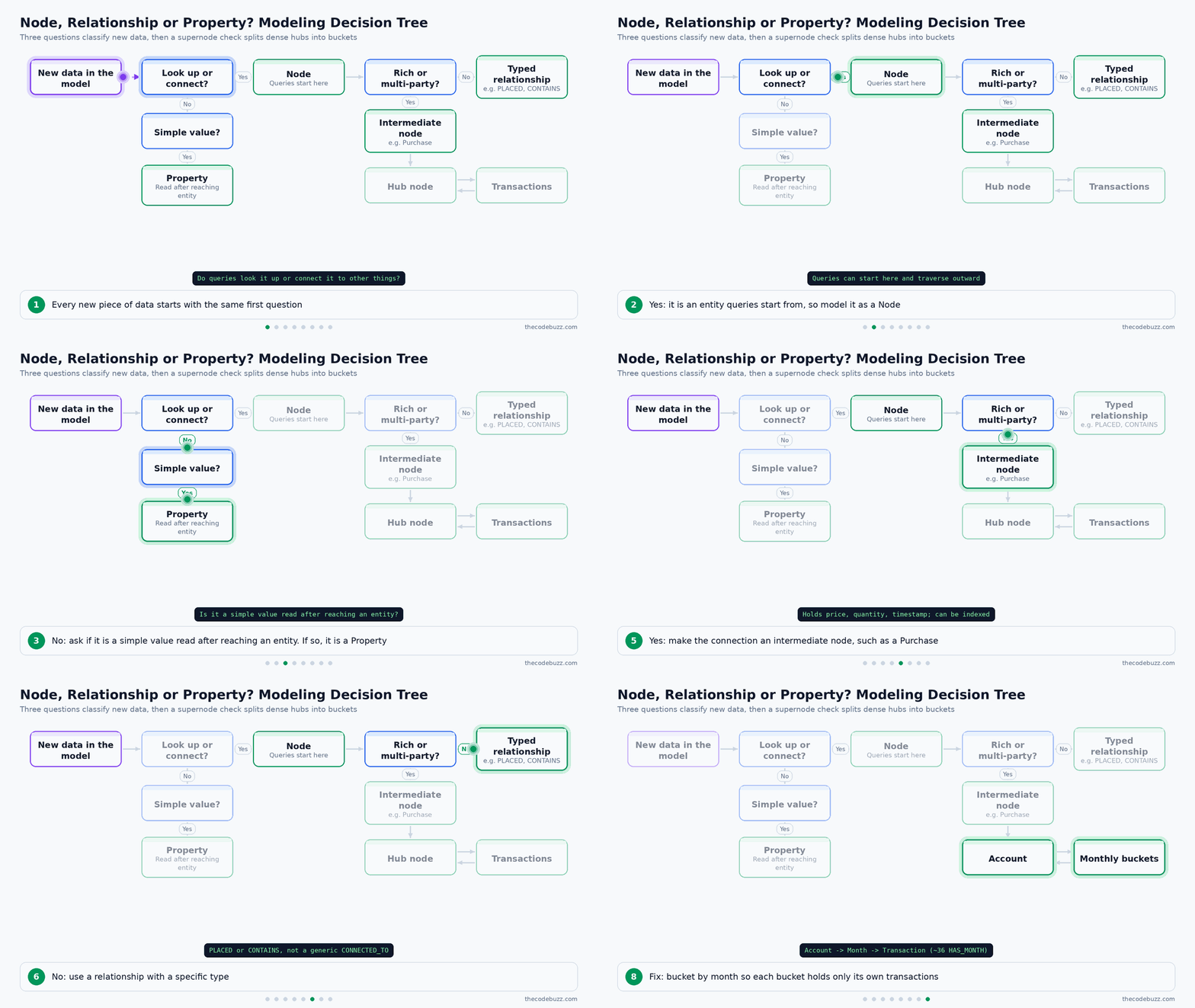
Keep the label count sensible. Add a new label when queries really need to tell the entities apart, not for every small variation.
When should a relationship become an intermediate node?
Use an intermediate node when the connection has rich data, joins more than two things, or must itself be connected or indexed. Example: in retail, a Purchase node can link a Customer, a Product and a Store, and carry the price, quantity and timestamp. A single relationship cannot join three entities.
How do I model date-range queries?
If queries must return results within a date range, consider a separate date node or relationship instead of a node property. The query then traverses to a small set of date nodes and follows their links, instead of testing a date property on a large number of candidate nodes.
How do I avoid supernodes?
A supernode is a dense node with a very large number of relationships. Traversing it is slow because the expansion has to touch every relationship it holds. Use these patterns:
- Split by relationship type: use distinct types instead of one type for everything.
- Bucket by time:
Account -> Month -> Transaction. - Add category nodes: put an intermediate node between the hub and its many neighbors.
- Filter on type and direction: name both in the pattern so the query ignores relationships it doesn’t need.
Example: a finance Account with millions of transactions is remodeled so each transaction hangs off a monthly bucket node. With one bucket per month, an account open for three years would hold about 36 HAS_MONTH relationships (an illustrative figure, your numbers will differ), and each month holds only its own transactions.
Which constraints does the bucketed model need?
Create the constraints before loading data, so every MERGE and MATCH in the model starts with an index seek and not a label scan. Each constraint creates a backing index on its key. Run these statements once, as separate commands:
Cypher
CREATE CONSTRAINT account_id_unique IF NOT EXISTS
FOR (a:Account) REQUIRE a.accountId IS UNIQUE;

CREATE CONSTRAINT month_key_unique IF NOT EXISTS
FOR (m:Month) REQUIRE (m.accountId, m.month) IS UNIQUE;

CREATE CONSTRAINT transaction_id_unique IF NOT EXISTS
FOR (t:Transaction) REQUIRE t.txId IS UNIQUE;
The composite constraint on Month makes the pair accountId and month the lookup key. A node key constraint on the same two properties also works if your edition supports it.
How do I create and query the monthly buckets?
Merge each node on its constrained key, then connect them, so a repeated load does not create duplicates. The query side starts at one account, so it is anchored on an indexed property.
Cypher
// Create: account, monthly bucket and transaction
MERGE (a:Account {accountId: $accountId})
MERGE (m:Month {accountId: $accountId, month: $month})
MERGE (a)-[:HAS_MONTH]->(m)
CREATE (m)-[:CONTAINS]->(:Transaction {txId: $txId, amount: $amount, postedAt: datetime($postedAt)});

// Query: one month of transactions for one account
MATCH (:Account {accountId: $accountId})-[:HAS_MONTH]->(:Month {month: $month})-[:CONTAINS]->(t:Transaction)
RETURN t.txId, t.amount, t.postedAt
ORDER BY t.postedAt;
The query finds one account through its constraint index, jumps to one month and reads only that month’s transactions. Run PROFILE on it with sample data to confirm the plan shows index seeks and no NodeByLabelScan.
When is a graph the wrong choice?
Use a relational database when the work is mostly aggregations over flat tables, bulk analytics scans, or data with few relationships. A graph pays off when queries follow connections, and it adds modeling effort that flat data does not repay.
Neo4j Indexes, Constraints and Cypher Query Optimization with EXPLAIN and PROFILE
The fastest Cypher queries start at specific nodes found through an index or constraint. Anchor every query on an indexed property, then check the plan with EXPLAIN (shows the plan, executes nothing) and PROFILE (runs the query and shows rows and db hits).
Note: An index works like the index at the back of a book: you look up a word and jump to the right page. A label scan is reading every page to find it. The analogy stops at writes, because Neo4j also has to update the index whenever data changes.
Which constraints and indexes should you create?
Create a uniqueness constraint on the natural key (e.g. a customer email or order number). It also creates the backing index, so lookups on that key become index seeks. Add range or text indexes for properties you filter on often.
Cypher
CREATE CONSTRAINT customer_email_unique IF NOT EXISTS
FOR (c:Customer) REQUIRE c.email IS UNIQUE;

CREATE INDEX order_date_range IF NOT EXISTS
FOR (o:Order) ON (o.orderDate);

CREATE TEXT INDEX product_name_text IF NOT EXISTS
FOR (p:Product) ON (p.name);
The first statement enforces uniqueness, the second speeds up date filters, and the third supports string matching on product names.
The constraint matters most for MERGE, which means “match this pattern or create it”. Without a constraint, MERGE may scan the label, and two concurrent transactions can both find nothing and both create the node. With the constraint, the lookup is an index seek and duplicates are rejected. The 2025 changelog added the MergeUniqueNode and MergeInto operators, so MERGE on a constrained key is cheaper than it used to be.
Cypher
MERGE (c:Customer {email: $email})
ON CREATE SET c.name = $name, c.createdAt = datetime()
ON MATCH SET c.lastSeen = datetime()
RETURN c.email;
The email and name come in as parameters, and the constrained key keeps the merge safe and fast.
How do you read a PROFILE plan?
Read the plan from the bottom up and look at the leaf operators first. Db hits are the units of storage work an operator does. Cardinality is the number of rows an operator produces (estimated in EXPLAIN, actual in PROFILE).
The animated diagram below shows the tuning loop: run EXPLAIN, run PROFILE, match the warning sign to a fix, and repeat until the plan shows an index seek.
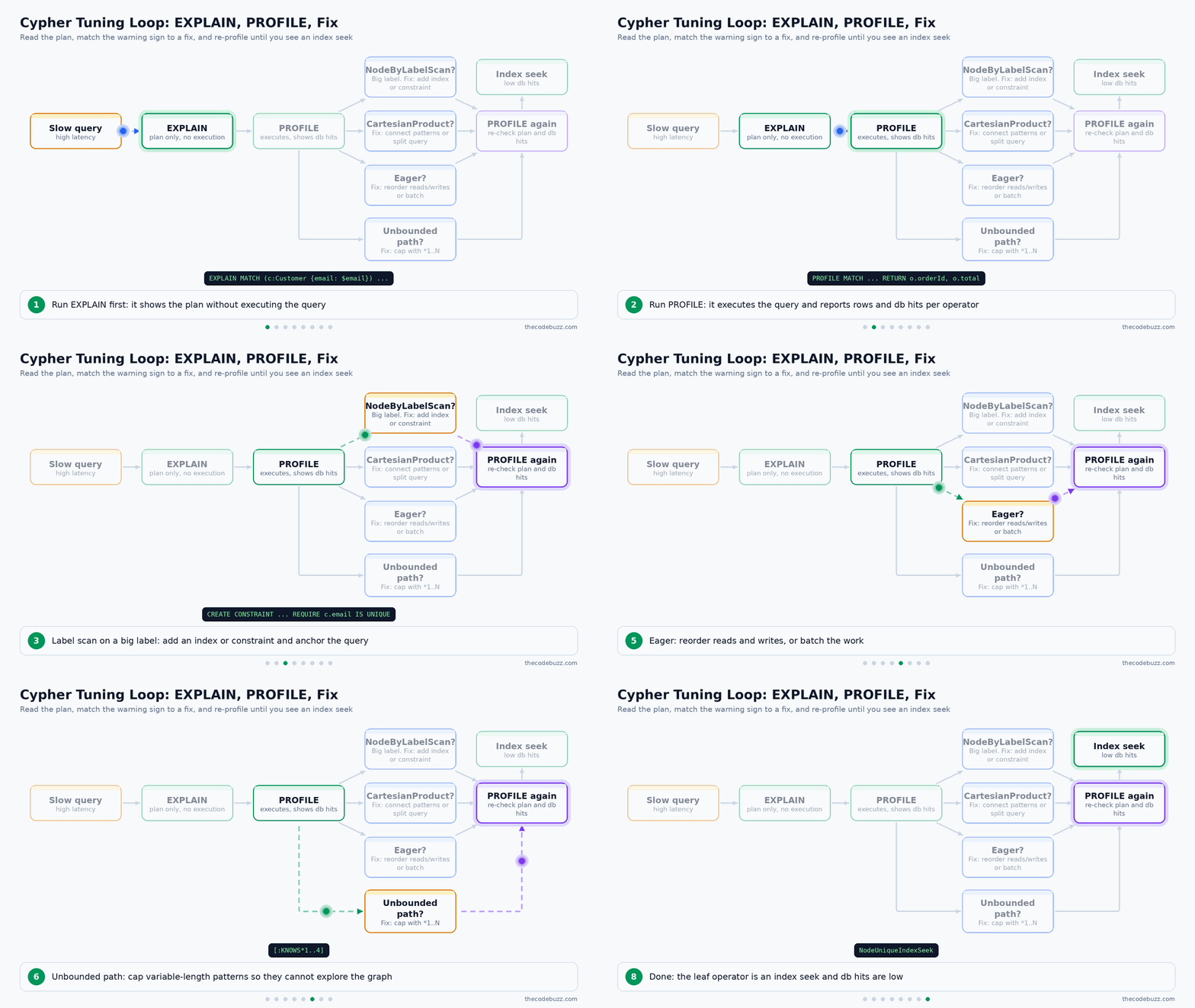
This table lists the operators you will see most often and what to do about each one:
| Operator | What it means | Action |
|---|---|---|
| NodeIndexSeek / NodeUniqueIndexSeek | Starts at specific nodes | Good, keep it |
| NodeIndexScan | Reads an index, no value lookup | Acceptable |
| NodeByLabelScan | Reads every node with the label | Add index or constraint |
| CartesianProduct | Pairs every row with every row | Connect the patterns |
| Eager | Loads all rows before continuing | Reorder reads and writes, or batch |
A large gap between estimated and actual rows is another warning, because the planner chose its plan on wrong numbers. PROFILE uses extra resources, so use it while tuning, not as a habit on every production query.
Here is a retail example. Before the constraint exists, the lookup is a label scan:
Cypher
PROFILE
MATCH (c:Customer {email: $email})-[:PLACED]->(o:Order)
RETURN o.orderId, o.total;

// Before: NodeByLabelScan on Customer, then Filter on email
// Fix:
CREATE CONSTRAINT customer_email_unique IF NOT EXISTS
FOR (c:Customer) REQUIRE c.email IS UNIQUE;
// After: NodeUniqueIndexSeek on Customer, far fewer db hits
The leaf operator changed from NodeByLabelScan to NodeUniqueIndexSeek, so the query touches one customer instead of all of them.
Which query rules improve Cypher performance?
These rules cover most Cypher query optimization work, and each one has a reason:
- Use parameters: Neo4j can auto-parameterize some simple literals, but that does not cover every query. Explicit parameters are the reliable way to get plan reuse, because the cached plan is shared across all values.
- Filter early: Fewer rows early means less work in every later operator.
- Aggregate early: Collapse rows before further matching or joining.
- Return properties:
RETURN o.orderId, o.totalmoves less data than returning whole nodes. - Cap variable-length paths: Write
[:KNOWS*1..4], because an unbounded path can explore most of the graph. - Be explicit: Give labels and relationship types, including on both ends of a relationship, so the planner has better statistics.
- Avoid Cartesian products: Two disconnected
MATCHpatterns multiply their rows. Connect them or split the query. - Limit OPTIONAL MATCH chains: Each one keeps rows alive that a plain
MATCHwould drop.
How do you run a parameterized query from Python?
Pass values as keyword arguments to execute_query and never build the query string by hand. This keeps plans reusable and blocks Cypher injection.
Python
from neo4j import GraphDatabase, RoutingControl

URI = "neo4j://localhost:7687"
AUTH = ("shop_app", "change-me")

with GraphDatabase.driver(URI, auth=AUTH) as driver:
    records, summary, keys = driver.execute_query(
        "MATCH (c:Customer {email: $email})-[:PLACED]->(o:Order) "
        "RETURN o.orderId AS orderId, o.total AS total",
        email="anita@example.com",
        database_="neo4j",
        routing_=RoutingControl.READ,
    )
    for record in records:
        print(record["orderId"], record["total"])
The email value travels as a parameter, and routing_=RoutingControl.READ sends the read to a suitable cluster member. The shop_app user is a placeholder account name, so assign it a least-privilege role such as the read-only role described in the security section.
Batching Writes and Choosing Between Cypher 25 and Cypher 5
Load data with CALL { } IN TRANSACTIONS instead of one huge transaction. Memory stays bounded and a failure only affects one batch. A transaction batch is a fixed number of input rows that are committed together as one small transaction.
How do you load data in batches?
Create the uniqueness constraint first, then read the rows and commit every 10,000 of them in their own transaction. MERGE on a constrained key means a re-run does not create duplicates, and the constraint is what enforces that.
Note: Think of moving house. One trip with every box will overload the van, but many trips with a few boxes each are safe, and a flat tyre only costs you one trip. Unlike boxes, a committed batch stays in the database even if a later batch fails.
This statement creates the constraint on the lookup key. Run it once, before the load, as its own statement:
Cypher
CREATE CONSTRAINT order_id_unique IF NOT EXISTS
FOR (o:Order) REQUIRE o.orderId IS UNIQUE;
The constraint also creates a backing index, so each MERGE looks up the order by orderId instead of scanning the Order label. IF NOT EXISTS makes the statement safe to repeat in deployment scripts.
This statement loads the orders in batches of 10,000 rows:
Cypher
LOAD CSV WITH HEADERS FROM 'file:///orders.csv' AS row
CALL (row) {
  MERGE (o:Order {orderId: row.orderId})
  SET o.total = toFloat(row.total)
} IN TRANSACTIONS OF 10000 ROWS;
The same pattern works with UNWIND $rows AS row for a parameter list. This statement must run in an implicit (auto-commit) transaction, so in Neo4j Browser prefix it with :auto and do not wrap it in BEGIN.
Can you run batches concurrently?
IN CONCURRENT TRANSACTIONS runs several batches in parallel and speeds up large loads. It can also deadlock when two batches try to lock the same node, for example two orders for the same customer.
The animated diagram below shows batches entering three lanes, a deadlock risk appearing, and DISJOINT BY routing the conflicting batches into separate lanes.

Cypher 25 adds DISJOINT BY to schedule batches so conflicting ones do not run together. The 2026 changelog marks it experimental, so test it on your own data before using it in production. Check the Cypher Manual for your exact server version for the current syntax, because experimental features can change.
A database-wide default batch strategy can be set with dbms.cypher.transactions.default_subquery_batch_strategy.
Cypher 25 vs Cypher 5: which should you use?
Use Cypher 25 for new work unless you depend on Cypher 5 features that it removed. The table compares the two languages.
| Aspect | Cypher 5 | Cypher 25 |
|---|---|---|
| Status | Frozen | Evolving, gains features with each server release |
| Changes allowed | Bug fixes and possible performance work | Additive only since it first appeared in server release 2025.06 |
| Origin | The earlier language line | Started as a clone of Cypher 5 |
| Additions | None | REPEATABLE ELEMENTS, NEXT, WHEN ... THEN subqueries, native full-text SEARCH and Path Modes (2026) |
| Removals | None | Some deprecated Cypher 5 features |
How do you set the Cypher version?
Set a default per database, and override it per query with a version prefix. This lets you migrate one database or one query at a time.
Cypher
ALTER DATABASE sales SET DEFAULT LANGUAGE CYPHER 25;

CYPHER 5
MATCH (c:Customer {customerId: $id}) RETURN c.name;

CYPHER 25
MATCH (c:Customer {customerId: $id}) RETURN c.name;
The first statement changes the default for the sales database. The prefixed queries run in the named version regardless of that default.
Warning: Since 2026.02 the
neo4j.confshipped with the server setsdb.query.default_language=CYPHER_25. If you reuse a config file across upgrades or new servers, check this setting, because it decides which language new databases default to.
Neo4j Performance Tuning and Operations: Memory, Monitoring, Backups and Upgrades
Size the page cache and heap separately, log slow queries, back up and rehearse restores, and treat every upgrade as a tested change. The monthly releases have shipped regressions, so none of this is optional for production.
How should you size memory and storage?
Neo4j uses two memory areas for different jobs. The page cache holds graph data and indexes, and the heap holds query execution state.
Note: Think of the page cache as a bookshelf next to your desk that keeps the books you read most often. The heap is the scratch paper for the question you are answering right now. A bigger bookshelf won’t help if your scratch paper keeps overflowing.
A larger page cache does not fix a query that builds huge intermediate results, because that pressure lands on the heap. Fix the query first (see the PROFILE guidance earlier in this article). Run the neo4j-admin server memory-recommendation command for a starting estimate, then adjust from monitoring data. Keep data files and transaction logs on fast SSD storage.
What should you monitor?
Turn on query logging first, so slow queries are recorded instead of guessed at. Here is a simple example for neo4j.conf that logs only queries slower than one second:
neo4j.conf
db.logs.query.enabled=INFO
db.logs.query.threshold=1s
At the INFO level, the threshold decides which queries are written to the log, so only queries that run longer than one second appear. Do not use VERBOSE for this purpose. It logs the start and end of every query and the threshold only applies at INFO, so the log grows quickly and the one-second filter has no effect.
Beyond the query log, track these:
- Page cache hit ratio: a falling ratio means the working set no longer fits in memory.
- Heap and GC: long or frequent garbage collection pauses point to queries holding too much state.
- Transaction counts: watch open, committed and rolled-back transactions for spikes.
Run PROFILE only on the worst offenders from the log, since it adds overhead.
How do you secure a Neo4j deployment?
Give the application a least-privilege user through role-based access control, and encrypt traffic with TLS for both Bolt and HTTP. Always pass values as parameters, which also prevents Cypher injection. The example below creates a read-only role for a reporting service:
Cypher
CREATE ROLE app_reader IF NOT EXISTS;
GRANT ACCESS ON DATABASE neo4j TO app_reader;
GRANT MATCH {*} ON GRAPH neo4j TO app_reader;
CREATE USER report_svc IF NOT EXISTS SET PASSWORD $password CHANGE NOT REQUIRED;
GRANT ROLE app_reader TO report_svc;
The service can now read the graph but cannot write or change the schema.
How do you back up and restore safely?
Take regular full and differential backups, then restore them into a separate environment on a schedule. A backup you have never restored is unproven. This command lets Neo4j choose between a full and a differential backup:
Shell
neo4j-admin database backup --from=db-host:6362 --type=AUTO --to-path=/backups/neo4j neo4jIf you use Ops Manager, version 1.15 and later (1.15.6 is current) needs a persistence database on Neo4j 5.26 LTS or newer.
What does clustering give you?
A cluster gives you availability and read scaling. Reads can be served by several members, while writes for a database go to its leader, which is one of the primary members for that database. A cluster does not replace backups.
How should you handle upgrades?
Pin to exact patch versions and test every upgrade in staging. The release notes record that 2026.07.0 could fail unexpectedly when using trim(), and 2026.08.0 could make some queries fail. Patch releases fixed both.
For clusters, read the upgrade notes first, then do a rolling upgrade one member at a time. Current builds are 5.26.33 and 2026.10.2, both released 6 November 2026. The table compares the two tracks:
| Aspect | 5.26 LTS | Calendar-versioned series |
|---|---|---|
| Cadence | Regular patches on a stable line | Roughly monthly releases |
| Suits | Teams that want few changes | Teams that want new features early |
| Trade-off | New features arrive later | More upgrades to test, with regressions seen in some releases |
Common Anti-Patterns and Production Readiness Checklist
Most Neo4j problems in production trace back to a short list of repeated mistakes. The table below shows each one, how it appears, and how to fix it.
Which Neo4j anti-patterns cause the most trouble?
| Anti-pattern | Symptom | Fix |
|---|---|---|
| Generic relationship type | Patterns need property filters to tell edges apart | Use specific types (e.g. PLACED, CONTAINS) |
| Supernode hub | Traversals through one node get slower as it grows | Split by type, bucket by time, add intermediate nodes |
| No constraint on MERGE key | Label scans, duplicates under concurrency | Create a uniqueness constraint |
| Literals instead of parameters | Plans are not reused, injection risk | Pass values as parameters |
| Cartesian product | CartesianProduct in the plan, row counts explode |
Connect the patterns or run them in separate steps |
| Unbounded variable-length path | Memory spikes, queries that never finish | Cap it, e.g. [:KNOWS*1..4] |
| Returning whole nodes | Large results, high db hits | Return only the properties you need |
| One giant import transaction | Heap pressure, long rollbacks | Use CALL { } IN TRANSACTIONS |
| Inherited default language | New databases use a different Cypher version than expected | Set the default per database and check neo4j.conf |
| Untested monthly upgrade | Queries fail after upgrade | Pin to patch releases and test in staging |
Note: A Cartesian product pairs every row from one list with every row from another, like matching each shirt with each pair of trousers. Two lists of 1,000 rows give 1,000,000 combinations.
What should you verify before going live?
Work through these steps in order and sign off each one.
- Validate the model: run your top queries against a loaded sample of real data.
- Verify indexes and constraints: create them, then confirm with
PROFILE. - Use parameters: no literals in application queries.
- Cap variable-length paths: every
*pattern gets an upper bound. - Batch imports: no single huge write transaction.
- Set the Cypher version: choose it per database.
- Size memory and log queries: page cache and heap sized separately, query logging on.
- Test restores: schedule backups and rehearse a restore elsewhere.
- Review security: role-based access control and TLS.
- Pin and rehearse upgrades: lock to a patch release and run the upgrade in staging first.
This snippet lists existing indexes and constraints so you can confirm steps 1 and 2:
Cypher
SHOW INDEXES YIELD name, type, labelsOrTypes, properties, state;
SHOW CONSTRAINTS YIELD name, type, labelsOrTypes, properties;
Every index should show ONLINE as its state, and each MERGE key should appear in the constraints list.
Key takeaways
- Queries drive the model: Write your most important queries first, load a sample of real data, and test the model against them before committing. The model can change when priorities change.
- Use specific relationship types and intermediate nodes: Name relationships after the verb (e.g.
PLACED,CONTAINS) instead of a genericCONNECTED_TO. When a connection carries rich data or links more than two things, make it a node. - Split supernodes by type or time: Bucket by month (Account to Month to Transaction), add category nodes, and always filter on a specific relationship type and direction.
- Combine a constraint, parameters and MERGE: Create a uniqueness constraint on the lookup key, pass values as parameters, and MERGE on that key. This gives you an index-backed lookup, plan reuse and safe upserts.
- Read PROFILE for the warning signs: Look for
NodeByLabelScanon large labels,CartesianProduct,Eagerand a big gap between estimated and actual rows. Cap variable-length paths and return only the properties you need. - Batch writes and treat DISJOINT BY as experimental: Use
CALL { } IN TRANSACTIONSso memory stays bounded and failures stay small. TestDISJOINT BYthoroughly before relying on it in production. - Choose the Cypher version deliberately: Set the default language per database and check your
neo4j.conf, because the shipped file has defaulted to Cypher 25 since 2026.02. Use Cypher 25 for new work and migrate gradually. - Pin patch releases and test restores: Monthly releases have shipped regressions (2026.07.0 and 2026.08.0), so rehearse upgrades in staging. A backup that has never been restored is unproven.
That’s all! Happy coding!
Did this article solve your Neo4j modeling or Cypher performance problem? Please share your questions and experience in the comments below.
Bookmark this guide or share it with your team, and subscribe to TheCodeBuzz for more database best-practices articles.
FAQ
How should I model data in Neo4j: node, relationship or property?
Use a node for an entity you look up or connect to, a relationship for a verb with a specific type (e.g. PLACED, CONTAINS), and a property for a value you only read after you reach the node. The exception is a connection that carries rich data, links more than two things, or must be indexed or connected itself. In that case, use an intermediate node, such as a Purchase node linking Customer, Product and Store. Write your important queries first and test the model on a loaded sample of real data.
How do I speed up a slow Cypher query?
Start by checking that the query is anchored on an indexed or constrained property, then work through the rest of this list:
- Parameters: Use them instead of literals so plans can be reused.
- Early filtering: Filter and aggregate as early as possible.
- Return only properties: Return the properties you need, not whole nodes.
- Capped paths: Put an upper bound on variable-length patterns, e.g.
[:KNOWS*1..4]. - PROFILE: Run it to see which operator is doing the most work.
What do EXPLAIN and PROFILE show, and which operators should I look for?
EXPLAIN shows the query plan without running the query, so nothing executes. PROFILE runs the query and adds the actual rows and db hits for each operator. Node index seek and node index scan are the operators you want, because they start the query at specific nodes. Treat NodeByLabelScan on a large label, CartesianProduct, Eager and a big gap between estimated and actual rows as warning signs. Use PROFILE only while tuning, since it uses extra resources.
How do I avoid supernodes (dense nodes) in Neo4j?
Change the model so no single node collects millions of relationships. Split relationships by type, bucket them by time (e.g. Account to Month to Transaction), or add intermediate category nodes. In queries, filter on a specific relationship type and direction so the expansion does not touch every edge. A supernode is slow to traverse because the expansion has to go through all of its relationships.
What is the difference between Cypher 5 and Cypher 25, and which should I use?
Cypher 5 is frozen and receives only bug fixes and possible performance work. Cypher 25 started as a clone of Cypher 5 and gains features with each server release, but it has allowed only additive changes since it first appeared in server release 2025.06. Use Cypher 25 for new work unless you depend on Cypher 5 features that it removed, and migrate gradually. You can set the default per database with ALTER DATABASE <name> SET DEFAULT LANGUAGE CYPHER 25 and override it per query with a version prefix.
Sources and further reading
- Neo4j deployment center (Neo4j)
- Cypher versioning (Neo4j)
- Changes in Neo4j 2025-2026 series – Operations Manual (Neo4j)